HomeNavigation arrowBlogNavigation arrow
Current page
Feature Updates

Weekly Recap: Faster Payouts, New PhotoTag Details & Redesigned Marketing Emails 💸✨

Weekly Recap: Faster Payouts, New PhotoTag Details & Redesigned Marketing Emails 💸✨
Hey photo friends! 👋

Candy here with another weekly recap! This week brings faster, more frequent payouts, a much more informative home for PhotoTags, redesigned marketing emails, and another round of Background Removal quality improvements.

Let’s jump in!

🏷️ NEW: PhotoTag Details Pages

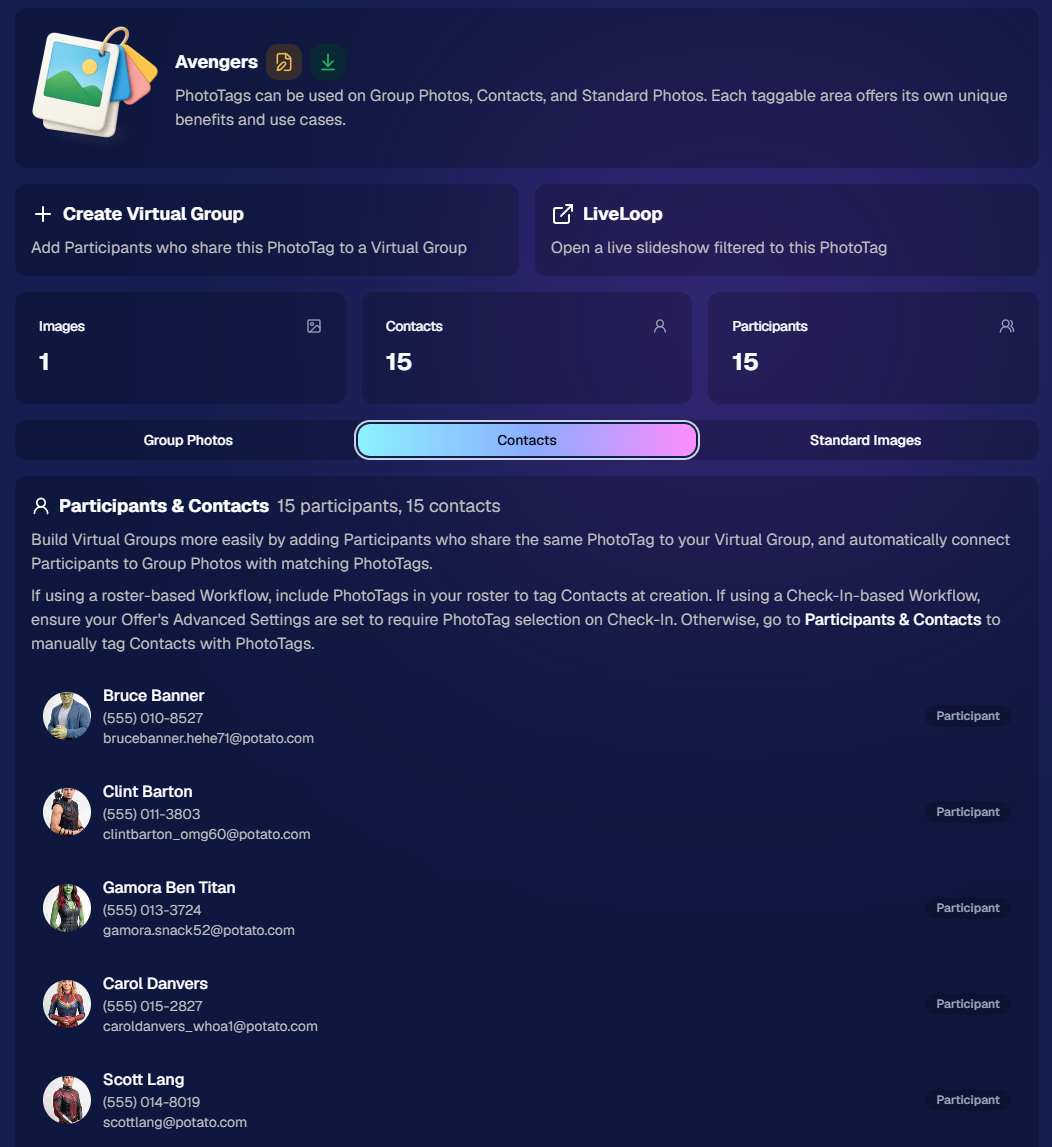
PhotoTags now have their own dedicated details pages.

Click any PhotoTag from the PhotoTag List page to open a much more complete view of everything connected to it.

From there, you can:

  • ✏️ Edit the PhotoTag
  • 👤 View tagged Participants and Contacts
  • 👥 View tagged Group Photos
  • 🖼️ View tagged Standard Photos

This is a pretty big improvement for anyone learning or managing PhotoTags!

PhotoTags can affect several different parts of an Event, and these pages make those relationships much easier to see in one place. They should also be especially helpful when training employees or helping someone understand exactly how a PhotoTag is being used.
💸 Faster, More Frequent Remittance Payments

We’ve sped up our remittance schedule and are adding a second payment cycle each week, helping completed-order funds reach your bank account sooner.

Previously, we sent your remittance statement on Wednesday, with the corresponding payment typically arriving in your bank account on Friday morning.

Going forward:

💰 Orders completed Friday through Tuesday will be included on your Wednesday remittance statement, with payment typically arriving Thursday

💰 Orders completed Wednesday and Thursday will be included on a new Friday remittance statement, with payment typically arriving Monday

That means the existing Wednesday payment cycle should now reach you about one day faster, while the new Friday cycle reduces the wait for orders completed later in the week.

✉️ Marketing Emails Get a New Look

Marketing emails have been redesigned with a cleaner, more modern layout.

There’s also a bigger change to the way images are protected:

  • 🌫️ Email image previews are now blurred
  • 🛡️ This replaces the previous scrolling copyright treatment

Blurring provides more consistent protection in situations where an email client might not properly render the scrolling copyright, or where the preview image is displayed outside an environment where GalleryGuard can protect it.
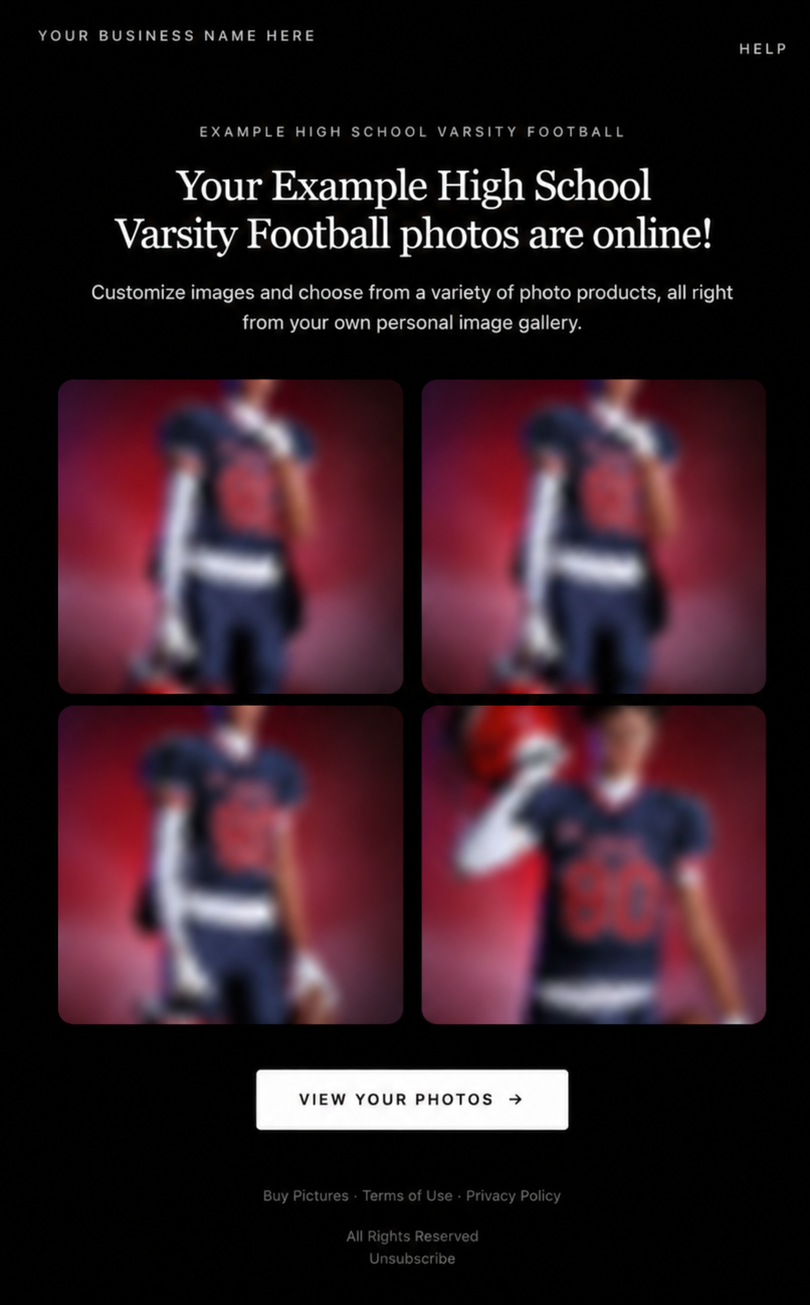
Real email, but with business & event name replaced for privacy!

Also: Minor Marketing Fix!

We also fixed an edge case that could prevent a marketing campaign from starting when two different Participants shared only part of their contact information.

For example, if two Participants had the same email address but different phone numbers, one Participant starting marketing should no longer incorrectly prevent the other from starting theirs.

✂️ Better Background Removal

Background Removal got another quality pass this week:

  • 💇 Improved hair cutouts
  • Better handling of certain sports portrait props, particularly soccer balls sitting on the ground

These changes continue our work to improve cutout quality across the kinds of images photographers are actually shooting.

🆕 "Quic" Is Now "Free"

The Quic programs have been rebranded to Free.

Nothing about the pricing or functionality has changed — just the names:

  • QuicPics → FreePics
  • QuicPortraits → FreePortraits
  • QuicPics GO! → FreePics GO!

Same programs, same functionality, same pricing. Just a (hopefully) clearer name moving forward.

🛍️ Retail Improvements

“Diamond Gloss” is now “Glossy Finish”

  • We’ve renamed "Diamond Gloss" to Glossy Finish on the retail site to make the option clearer and easier for customers to understand.

📱 More reliable iOS sharing

  • The native iOS share sheet used by the press-and-hold download feature should now open more reliably.

👥 Group Digital Downloads now behave like regular Digital Downloads

  • When no overlay is selected — or the Event doesn’t have one — Group Digital Downloads can now provide the full-resolution, uncropped original.
  • That means the image can be available immediately from the email receipt and avoids problematic cropping steps on Group Photos that aren’t a standard 2:3 aspect ratio.

📦 More accurate package previews

  • Fixed cases where Group and non-Group images could appear as previews for the wrong type of package product.

🖥️ Dashboard Improvements

📴 New offline screen

  • If your device is completely offline, the Dashboard now tells you instead of leaving you wondering whether the site is simply loading slowly.

📅 Event Calendar color coding fixed

  • Events once again display the correct colors based on their Event Program.

🖼️ Better Virtual Group Foreground management

  • The Foreground Picker now shows the names of your saved foregrounds. Click one to preview it, and you can also rename foregrounds for easier reuse later.

✂️ Overwritten BGR images can reprocess

  • If you overwrite an image inside a folder marked for Background Removal, it can now be reprocessed as long as the replacement has the exact same dimensions as the original.
  • If the dimensions differ at all, the existing PNG will not be replaced.

📋 Roster upload error fix

  • Fixed an edge case where a malformed email containing a # instead of an @ could stop the roster upload process and leave only the rows before that error imported.

👤 Participant names on QR downloads

  • QR download pages now display participant names in bold, making them easier to spot at a glance.

📊 Clearer Sales & Shipping chart details

  • Tooltips on the Event Details Sales & Shipping chart now break out Sales and Shipping separately on hover, adding some clarity.

Capture App 5.10.1 (OTA)📱

📱Selfie Check-In Station Mode fix

  • The Continue button text has been shortened, and the Close button now stays accessible when PhotoTag Check-In is enabled.
  • Previously, the extra PhotoTag selection row could push the Close button off the bottom of the screen.

That’s the week!

The FreePics name change is the most visible update, but the new PhotoTag Details pages may be one of the most useful additions for teams working with PhotoTags regularly.

Keep creating magic,

Candy 🍬

Related articles

Big News: Explore the New NowCandid Retail Site Features! 🌟
Feature Updates
August 21, 2024

Big News: Explore the New NowCandid Retail Site Features! 🌟

8
 minutes read
Hey there, awesome photographers!

Candy here, and I’m so excited to share some incredible updates that are live on the NowCandid retail site.

We’ve been hard at work making your clients' shopping experience smoother, faster, and more enjoyable. Let’s dive into the fantastic new features that are sure to elevate client satisfaction and boost your sales! 📸✨

Seamless Third-Party Logins 🔐

We know how important it is for your customers to have quick and easy access to their galleries and order history. That’s why we’ve introduced third-party login options!

Now, your clients can save their galleries and order history by logging in with their preferred platform—X/Twitter, Google, Apple, or Facebook. It’s all about convenience and keeping their memories just a click away!

(retail theme: liquorice)

Sleek and Modern UI 🎨

The NowCandid retail site has undergone a major facelift! Our new interface is clean, modern, and minimalist, with a step-by-step ordering process that makes purchasing photos easier than ever.

The site was built mobile-first to ensure the ideal mobile phone experience, recognizing that mobile traffic has become a huge chunk of retail web traffic in recent years, especially with the effectiveness of SMS marketing that NowCandid provides.

Whether your customers are browsing on a computer or mobile device, the improved look ensures a seamless and enjoyable experience.

(retail theme: liquorice - watermarks: off)

Instant Product Rendering 🖼️

Curious about how your clients' photos will look on different products? We’ve got you covered! As soon as they select a photo, it instantly renders on most products in our gallery. Plus, when adding certain products to their cart, customers can choose different colors and art styles, and input text fields—all of which will render as they make their choices.

This means your clients can see exactly how their image will appear on prints, canvases, and more as they peruse the product list and customize their orders. This visual preview is sure to enhance their shopping experience!

(retail theme: marshmallow - watermarks: off)

AI Background Generator for BGR Images 🤖🎨

Get creative with your background-removed (BGR) images using our new AI Background Generator! Now, your end customers can type in text prompts to generate fun and unique backgrounds for their photos.

Whether they want a beach scene, a starry night, or something entirely imaginative, the AI will bring their vision to life. The possibilities are endless and sure to delight your clients!

(retail theme: starburst - watermarks: off)

Retouch All Switch ✨

We know your clients want their photos to look their best, so we’ve added a “Retouch All” switch during checkout. With just a flip, they can apply light retouching to everything in their cart.

This retouching includes slight blemish reduction, smoothing of complexion, red-eye removal, teeth whitening, and eye brightening. It’s the perfect way to ensure their prints are picture-perfect! While also generating you additional revenue.

(retail theme: starburst - watermarks: off)

Diamond Gloss Upsell 💎

Looking to add a little extra shine to your clients' prints? Our new Diamond Gloss upsell option lets them do just that!

For a few extra dollars, they can add a glossy coating to their prints, giving them a luxurious, high-quality finish that they’ll love.

In the future, we will be adding more unique print upsells, stay tuned!

(retail theme: cookie dough - watermarks: off)

Improved Express Checkout 🚀

Time is precious, and we want to make checking out as fast as possible for your photo subjects! With our improved express checkout UI, they can now breeze through their purchase with Apple Pay.

And we’re not stopping there—Google Pay and PayPal express checkout options are coming soon, with more to follow in the future!

(retail theme: starburst)

Other Exciting Features 🌟

We’ve packed in even more updates to enhance your clients' experience:

  • Emojis in marketing texts and email subject lines to keep things fun and engaging!
  • Automatic name pre-fill (when name is available) on applicable products for a personalized touch.
  • New, sleek designs for Selfie Check-In and Scan Card Check-In web pages.
  • Improved URL and shareability with our new primary retail URL: www.quic.pics
  • The Photo Synthesis gallery allows customers to view all their images from past events in one place via their account settings.
  • Nicer-looking receipts and custom sender addresses (your-business-name@quic.pics) for a polished presentation.
  • Server-related improvements for quicker website loading, ensuring a fast and smooth experience for your clients.

These changes are designed to improve client satisfaction and increase your sales totals. We’re beyond excited about these enhancements, and we know your customers will love them!

As always, if you have any questions or need help navigating these new features, we’re here to assist you.

Thank you for being part of the NowCandid community!

Cheers and sparkles,


Candy 🍬

Big News: Introducing Full Frame Overlay! 🎨✨
Feature Updates
August 14, 2024

Big News: Introducing Full Frame Overlay! 🎨✨

4
 minutes read
Hey there, amazing photographers!

Candy here, bringing you some exciting news in our "Big News" series. We’re thrilled to introduce a brand-new feature to NowCandid: the Full Frame Overlay!

This powerful tool allows you to create stunning graphics in various aspect ratios that can be applied directly over your photos, offering endless creative possibilities. Let’s dive into the details! 🌟

What is Full Frame Overlay? 🖼️

Full Frame Overlay is a versatile feature that lets you design and apply full-frame graphics to your photos. Unlike our Banner Overlay, which places graphics at the bottom of your images, Full Frame Overlay covers the entire image, adding a creative flair that your clients will love.

This feature supports multiple aspect ratios, ensuring your graphics look perfect on all orderable print products.

Here’s what you need to know:

  • Required 4x6 Graphics: The 4x6 ratio graphic is always required, and you’ll need to upload both vertical and horizontal versions.
  • Optional Aspect Ratios: In addition to the 4x6, you can also create and upload graphics in 5x7, 8x10, and 11x14 aspect ratios. These are optional, so you can choose which sizes best fit your Event!
  • Resolution & Format: Your graphics should be PNGs with transparency, around 300 DPI, and in the SRGB color profile. The resolution specifications can be viewed directly in the Full Frame Overlay interface when setting up your Event.

Check out the screenshot below for a glimpse of the new Full Frame Overlay interface:

How Does It Look? 👀

Full Frame Overlay lets you get creative! Whether you’re adding a fun border, a festive holiday theme, or a sleek corporate design, the possibilities are endless. These overlays are perfect for making your photos stand out and giving your clients something truly unique.

Here’s an example of a photo with a Full Frame Overlay applied:

More Resources on the Way 📚

We know that creating the perfect overlay can take time, so we’re here to help! In addition to our existing Banner Overlay Canva Templates, in the future we’ll be adding Full Frame Overlay Canva Templates to our Resources page. These templates will make it even easier to design beautiful graphics that fit perfectly with your photos.

We can’t wait to see how you use the Full Frame Overlay to elevate your photography and create amazing products for your clients!

As always, if you have any questions or need assistance, don’t hesitate to reach out—we’re here to help.

More examples of Full Frame Overlays below!

Cheers and sparkles,

Candy 🍬

Big News: Introducing NowCandid's Mobile Dashboard App 2.0! 📲✨
Feature Updates
August 8, 2024

Big News: Introducing NowCandid's Mobile Dashboard App 2.0! 📲✨

6
 minutes read

Hey there, fabulous photographers! Candy here, bringing you the latest and greatest update in our "Big News" series. Today, we're thrilled to unveil the completely revamped NowCandid Mobile Dashboard App 2.0.

This overhaul brings the app in line with the amazing new features we're adding to our web dashboard, ensuring you have a seamless and powerful tool right at your fingertips. Let's dive into what's new and why you should update to Mobile Dashboard 2.0 today! 🌟

A Fresh and Improved UI 🎨

First things first, the Mobile Dashboard App 2.0 boasts a much-improved user interface. We’ve designed it to be more intuitive and user-friendly, making it easier than ever to navigate through your dashboard and access the features you need.

  • Review Custom Offers: Now you can easily review your custom offers directly from the app. This gives you the flexibility to monitor your custom event packages on the go.

Web Dashboard Integration 🔗

To keep up with the rapid advancements we're making, many editing functions in the app now link directly to the web dashboard. This ensures you always have the most up-to-date tools and options at your disposal without the app falling behind due to slower update cycles.

  • Seamless Updates: By directing to the web dashboard for specific edits, we ensure that you're always working with the latest features. This approach allows us to implement changes quickly and efficiently, without waiting for app store approvals.

Enhanced Candy Chat 💬

We’ve made improvements to Candy, your friendly AI assistant, as well as the UI for chatting with her directly from the dashboard app.

  • Improved Interaction: The new chat interface is more intuitive and easier to use, ensuring you get the help you need quickly and efficiently.

Folder-Level Sales Reports & Stats 📊

Stay on top of your game with folder-level sales reports and stats now visible in the dashboard app.

  • Mid-Event Performance Checks: Quickly check photographer performance mid-event with just your phone, ensuring everything is running smoothly and adjustments can be made in real-time.

Easy Access to LiveLoop Links 🔗

We’ve made accessing LiveLoop links for each event even easier. Now, you can quickly find and share these links directly from the app.

  • Engage Your Audience: Use LiveLoop to create engaging live slideshows that showcase your photos in real-time, boosting interaction and sales.

Improved Image Management 📸

Managing images has never been easier. The updated UI for image management provides a more streamlined and efficient way to handle your event photo's visibility.

Update to Mobile Dashboard 2.0 Today! 🚀

It’s crucial to update to Mobile Dashboard App 2.0 as soon as possible. Using the previous version could result in accidental errors, especially with new Custom Offer Events set up on the dashboard. These new events are not meant to be editable with the older app version.

Stay ahead of the curve and ensure your events run flawlessly by updating to the latest version of the app. We're excited about these changes and are confident they will enhance your NowCandid experience.

Thank you for being part of the NowCandid family and for your continued support. Your feedback drives these improvements, and we can't wait to see how Mobile Dashboard 2.0 helps you succeed!

Cheers and sparkles,

Candy 🍬

Let’s get in touch

If you’re a photographer looking to add NowCandid™ services to your wheelhouse, set up a call with us!

How to customize formatting for each rich text

How to customize formatting for each rich text

How to customize formatting for each rich text

How to customize formatting for each rich text

How to customize formatting for each rich text

What’s a Rich Text element?

The rich text element allows you to create and format headings, paragraphs, blockquotes, images, and video all in one place instead of having to add and format them individually. Just double-click and easily create content.

A rich text element can be used with static or dynamic content. For static content, just drop it into any page and begin editing. For dynamic content, add a rich text field to any collection and then connect a rich text element to that field in the settings panel. Voila!

Headings, paragraphs, blockquotes, figures, images, and figure captions can all be styled after a class is added to the rich text element using the "When inside of" nested selector system.

  • List One
  • List Two
  • List Three
  • List Four
  • List Five

This is a link

This is bold text