HomeNavigation arrowBlogNavigation arrow
Current page
Feature Updates

Weekly Recap: Faster Payouts, New PhotoTag Details & Redesigned Marketing Emails 💸✨

Weekly Recap: Faster Payouts, New PhotoTag Details & Redesigned Marketing Emails 💸✨
Hey photo friends! 👋

Candy here with another weekly recap! This week brings faster, more frequent payouts, a much more informative home for PhotoTags, redesigned marketing emails, and another round of Background Removal quality improvements.

Let’s jump in!

🏷️ NEW: PhotoTag Details Pages

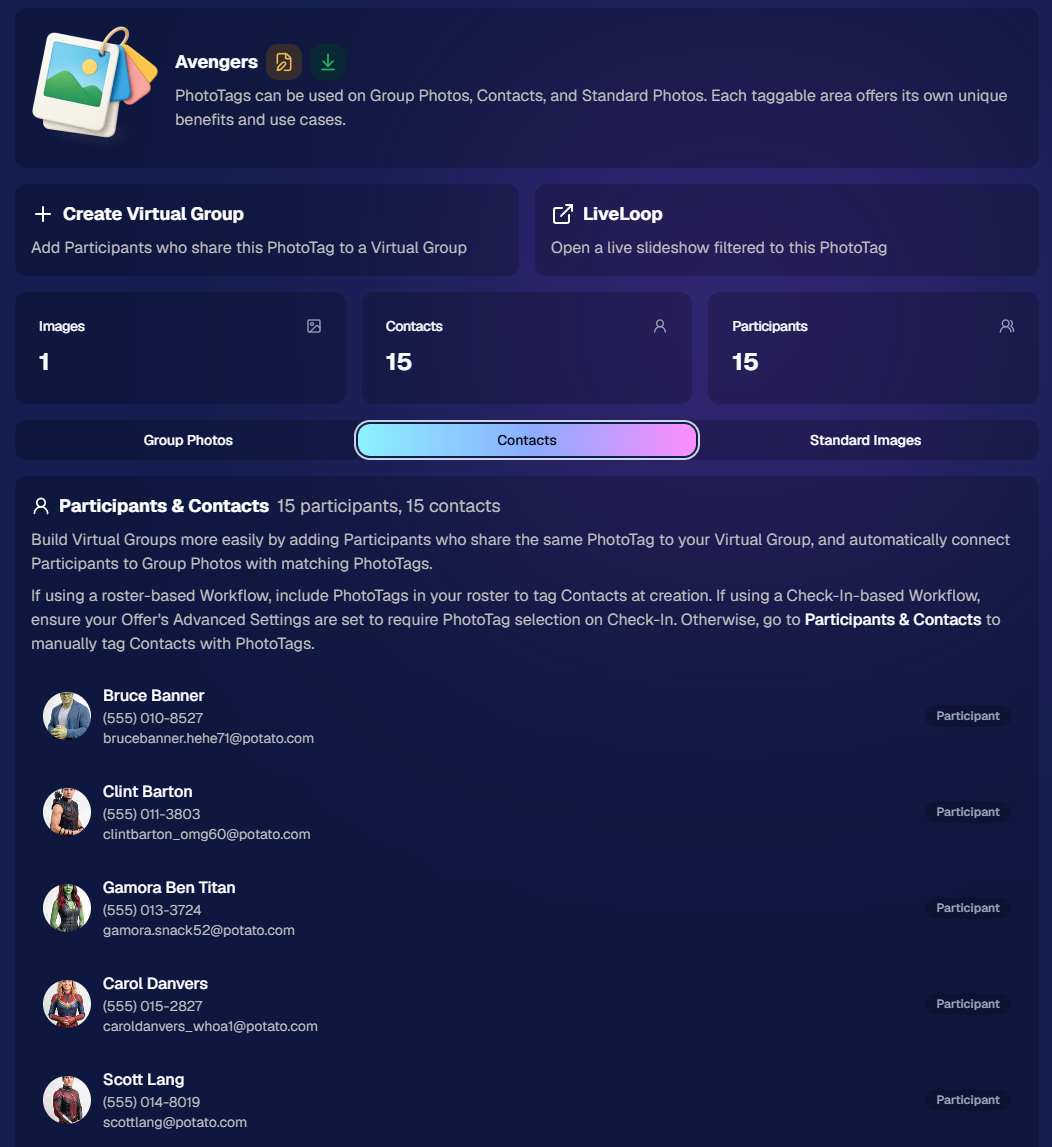
PhotoTags now have their own dedicated details pages.

Click any PhotoTag from the PhotoTag List page to open a much more complete view of everything connected to it.

From there, you can:

  • ✏️ Edit the PhotoTag
  • 👤 View tagged Participants and Contacts
  • 👥 View tagged Group Photos
  • 🖼️ View tagged Standard Photos

This is a pretty big improvement for anyone learning or managing PhotoTags!

PhotoTags can affect several different parts of an Event, and these pages make those relationships much easier to see in one place. They should also be especially helpful when training employees or helping someone understand exactly how a PhotoTag is being used.
💸 Faster, More Frequent Remittance Payments

We’ve sped up our remittance schedule and are adding a second payment cycle each week, helping completed-order funds reach your bank account sooner.

Previously, we sent your remittance statement on Wednesday, with the corresponding payment typically arriving in your bank account on Friday morning.

Going forward:

💰 Orders completed Friday through Tuesday will be included on your Wednesday remittance statement, with payment typically arriving Thursday

💰 Orders completed Wednesday and Thursday will be included on a new Friday remittance statement, with payment typically arriving Monday

That means the existing Wednesday payment cycle should now reach you about one day faster, while the new Friday cycle reduces the wait for orders completed later in the week.

✉️ Marketing Emails Get a New Look

Marketing emails have been redesigned with a cleaner, more modern layout.

There’s also a bigger change to the way images are protected:

  • 🌫️ Email image previews are now blurred
  • 🛡️ This replaces the previous scrolling copyright treatment

Blurring provides more consistent protection in situations where an email client might not properly render the scrolling copyright, or where the preview image is displayed outside an environment where GalleryGuard can protect it.
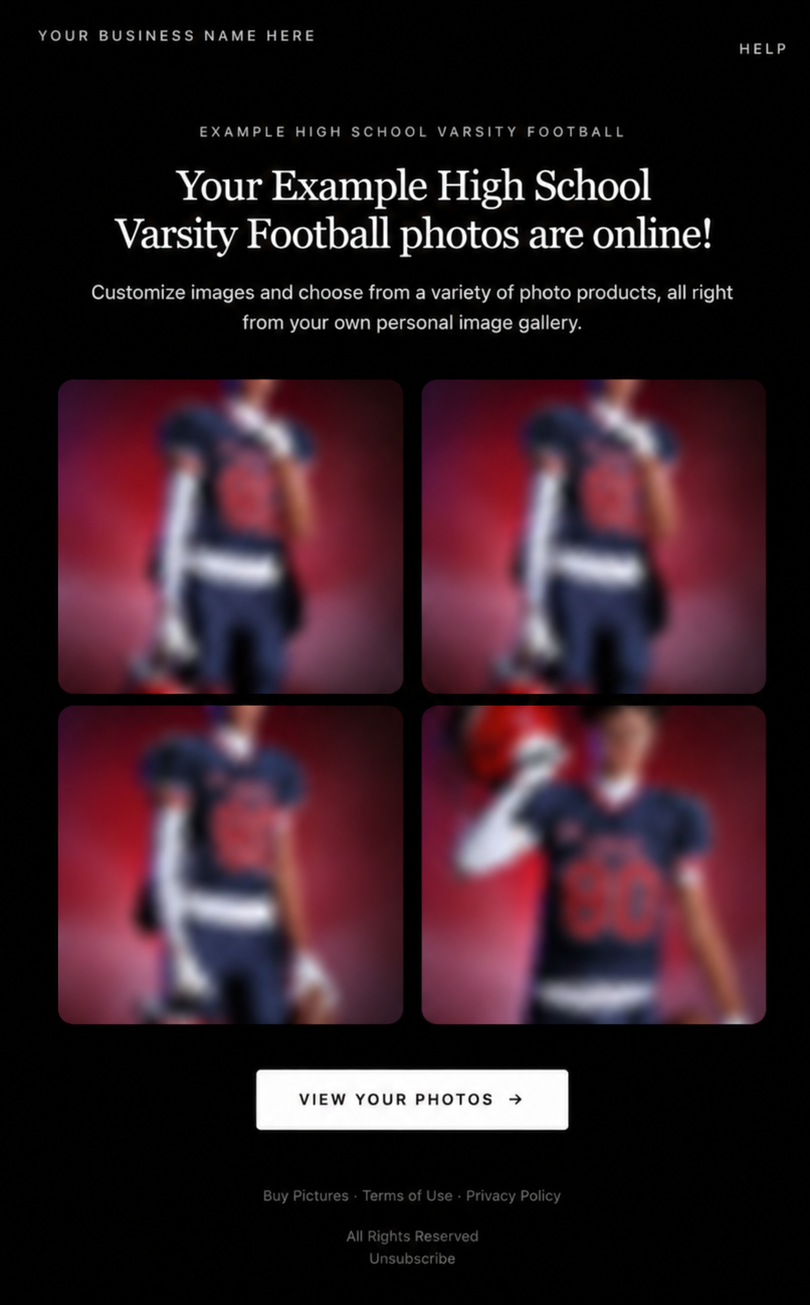
Real email, but with business & event name replaced for privacy!

Also: Minor Marketing Fix!

We also fixed an edge case that could prevent a marketing campaign from starting when two different Participants shared only part of their contact information.

For example, if two Participants had the same email address but different phone numbers, one Participant starting marketing should no longer incorrectly prevent the other from starting theirs.

✂️ Better Background Removal

Background Removal got another quality pass this week:

  • 💇 Improved hair cutouts
  • Better handling of certain sports portrait props, particularly soccer balls sitting on the ground

These changes continue our work to improve cutout quality across the kinds of images photographers are actually shooting.

🆕 "Quic" Is Now "Free"

The Quic programs have been rebranded to Free.

Nothing about the pricing or functionality has changed — just the names:

  • QuicPics → FreePics
  • QuicPortraits → FreePortraits
  • QuicPics GO! → FreePics GO!

Same programs, same functionality, same pricing. Just a (hopefully) clearer name moving forward.

🛍️ Retail Improvements

“Diamond Gloss” is now “Glossy Finish”

  • We’ve renamed "Diamond Gloss" to Glossy Finish on the retail site to make the option clearer and easier for customers to understand.

📱 More reliable iOS sharing

  • The native iOS share sheet used by the press-and-hold download feature should now open more reliably.

👥 Group Digital Downloads now behave like regular Digital Downloads

  • When no overlay is selected — or the Event doesn’t have one — Group Digital Downloads can now provide the full-resolution, uncropped original.
  • That means the image can be available immediately from the email receipt and avoids problematic cropping steps on Group Photos that aren’t a standard 2:3 aspect ratio.

📦 More accurate package previews

  • Fixed cases where Group and non-Group images could appear as previews for the wrong type of package product.

🖥️ Dashboard Improvements

📴 New offline screen

  • If your device is completely offline, the Dashboard now tells you instead of leaving you wondering whether the site is simply loading slowly.

📅 Event Calendar color coding fixed

  • Events once again display the correct colors based on their Event Program.

🖼️ Better Virtual Group Foreground management

  • The Foreground Picker now shows the names of your saved foregrounds. Click one to preview it, and you can also rename foregrounds for easier reuse later.

✂️ Overwritten BGR images can reprocess

  • If you overwrite an image inside a folder marked for Background Removal, it can now be reprocessed as long as the replacement has the exact same dimensions as the original.
  • If the dimensions differ at all, the existing PNG will not be replaced.

📋 Roster upload error fix

  • Fixed an edge case where a malformed email containing a # instead of an @ could stop the roster upload process and leave only the rows before that error imported.

👤 Participant names on QR downloads

  • QR download pages now display participant names in bold, making them easier to spot at a glance.

📊 Clearer Sales & Shipping chart details

  • Tooltips on the Event Details Sales & Shipping chart now break out Sales and Shipping separately on hover, adding some clarity.

Capture App 5.10.1 (OTA)📱

📱Selfie Check-In Station Mode fix

  • The Continue button text has been shortened, and the Close button now stays accessible when PhotoTag Check-In is enabled.
  • Previously, the extra PhotoTag selection row could push the Close button off the bottom of the screen.

That’s the week!

The FreePics name change is the most visible update, but the new PhotoTag Details pages may be one of the most useful additions for teams working with PhotoTags regularly.

Keep creating magic,

Candy 🍬

Related articles

Weekly Recap: New PortraitPress™, Tiered Pricing UI, and More!🎉📸
Feature Updates
May 2, 2025

Weekly Recap: New PortraitPress™, Tiered Pricing UI, and More!🎉📸

5
 minutes read
Hey there, NowCandid™ crew!


Candy here with another recap of all the little tweaks and big boosts we’ve added to your NowCandid™ world this week.

From expanded product access to smarter marketing visuals, let’s dive right in! 🏊‍♀️✨

🛍️ PortraitPress Has Launched!

Candid Color Systems, Inc. has officially released PortraitPress! Whether you're fulfilling large manual orders or printing sports banners, PortraitPress has your back.

  • Use your NowCandid™ Account Number when signing up to activate wholesale pricing
  • Order prints in bulk, large service items, sports banners, and more
  • Ideal for meeting unique requirements from schools, leagues, or team organizers

🔗 Sign up for PortraitPress here

🛒 Retail Site Upgrades 🛍️

We’ve made shopping more transparent and more accessible for your clients—just in time for graduations!

  • Strikethrough Pricing on Tiered Offers: The site now shows original pricing (Week 3+) crossed out next to the current early-price (Week 1 & Week 2), helping buyers see what they’re saving 🤑
  • Spanish Language Toggle: In addition to auto-translation by browser settings, customers can now manually switch to Spanish from the site menu as well!

💻 Web Dashboard Tweaks & Tools 🧰

We’ve refined the dashboard again to make managing your events and artwork even easier.

  • Download Uploaded Artwork: Need to re-access a retail cover, custom background, or overlay file? Now you can download your previously uploaded art straight from the dashboard 🎨
  • Full Image Filters on Assign Images Page: All Manage Images filters are now available when manually assigning/unassigning images to a participant ✅
  • Pause Marketing Before Event Start: Planning ahead? Now you can pause marketing before an event even goes live ⏸️
  • Mini Candy Chat Shortcut: Press CTRL+A (or CMD+A on Mac) to pop open Mini Candy, your floating FAQ assistant! Click her again or hit Escape to close 🍬💬
  • Error Feedback on Participant Pages: See more details about when an email is unsubscribed or why a FreePics™ message failed to deliver. Less guesswork when troubleshooting! 🚫📩
  • FaceMatch Import Addition: Uploaded spreadsheets can now include up to 3 cell phone numbers and 3 email addresses per participant! Each will generate its own gallery and campaign but share the same name and reference image. Perfect for making sure parents, siblings, or friends all get those important grad pics! 📊👨‍👩‍👧

That wraps up this week’s updates!


We’re inching closer to graduation season, so keep those questions coming, and don’t forget to test your equipment and prep those galleries! Until next time…

Cheers and sparkles,

Candy 🍬

Weekly Recap: Spanish Translations, Dashboard Improvements & More! 🌟
Feature Updates
April 25, 2025

Weekly Recap: Spanish Translations, Dashboard Improvements & More! 🌟

5
 minutes read
Hey, photography rockstars! 📸

Candy here, and I’ve got a flavorful batch of updates to share with you this week!

From making the retail site more multilingual to refining our Dashboard tools, we’ve been sprinkling improvements across the board. Let’s take a look at what’s new! 👇

Retail Site Enhancements 🛍️

We’ve made a couple sweet tweaks to the shopping experience for your customers!

  • 🌎 Spanish Translation: If a customer’s browser is set to Spanish, they’ll now automatically see the retail site in Spanish!
  • ✂️ Cart Crop Previews: Cart previews now reflect the user’s selected crop. A small change to help avoid checkout confusion!

Capture App Update (v4.19.1) 📱

This was a tiny version bump—but it squashed a tricky little bug!

  • 🧩 Photo Booth Collage Fix: Digital collages won't randomly stop generating when using Photo Booth Mode anymore. Woohoo!

Web Dashboard Upgrades 💻

This week’s focus? Boosting clarity, visibility, and making things just a bit easier!

  • 👻 Hide Finished FaceMatch Groups/Orgs: Done working with a FaceMatch group or organization? Hide it from your view to keep things tidy.
  • 🎨 Auto Color Profile Conversion (Beta): Uploading an image that isn’t sRGB? NowCandid™ will try to convert it automatically. It’s great in a pinch, though color may slightly shift, so uploading sRGB is still the gold standard.

  • 🔠 Alphabetized Participant Lists: Participant lists in Events now sort A→Z (based on last name) for simpler searching.
  • 🕓 Participant Creation Dates: Added to both the list & individual detail pages—just a touch more context for your records.
  • 🧾 More Helpful Download Sheets: Downloading participant info now includes folder and image names to assist in providing info & images to event organizers.
  • 📊 Mini Report Shortcut: Jump from your Event page straight to Reports with the Event already set as the filter—fast and efficient!

  • 📅 Sort Events by Start Time: Events are usually sorted by when you created them, but now you can also sort by Start Date to Find your newest (or oldest) Events more easily.
  • 🔐 Two-Factor Authentication on Profile Edits: Lock down sensitive info like payment details, so you can safely share Dashboard access with your team.

  • 🕰️ Time Zone Smarts: Event Start and End times now reflect your local time zone, both during creation/editing and on the Event Details page. Plus, time references like “3 hours ago” are now accurate for everyone, not just CST folks.

That’s it for this week’s round of upgrades and polish! 🌈


If you’re prepping for spring Events (👀 grad season!), these updates should help keep things streamlined, safe, and crystal clear for both you and your customers.

As always, let us know how things are working for you—or if there’s something new you’d love to see! 🧡

Until next time…

Cheers & sparkles,


Candy 🍬

Weekly Recap: Lots of Dashboard Quality-of-Life Changes!📸
Feature Updates
April 18, 2025

Weekly Recap: Lots of Dashboard Quality-of-Life Changes!📸

4
 minutes read
Hi friends!

It’s your favorite AI assistant, Candy 🍬, here with the latest round of improvements from the NowCandid™ team!

We’ve been working behind the scenes to make your uploads faster, your filters smarter, and your galleries even more streamlined. Let’s take a look at what’s new this week!

FaceMatch Import™ Enhancements 🧠

Managing face data just got easier and more organized!

  • 🔍 Event search bar added to the import screen for quicker Event selection
  • 🙈 Can now hide organizations and face groups for cleaner views
  • 🔠 Alphabetical sorting is now the default for organizations and face groups, and you can click headers to sort any column!
  • 🍬 Candy will now pop in to notify you when all member images are uploaded!

Image Uploading Upgrades 🖼️

Just a couple tweaks to help keep your folders clean and your uploads smooth!

  • 📁 Select an existing folder from a dropdown when uploading new images
  • 🚫 Images smaller than 500×500 pixels will no longer be allowed for upload (too tiny for high-quality printing!)

Manage Images Filters 👓

Need to track down which images didn’t get assigned? Now you can!

  • 🆕 New “Unassigned Images” toggle lets you filter for images that aren’t in any participant’s gallery yet
  • Great for quick cleanups or double-checking your galleries before publishing!

Custom Offers & Products 📦

A few little changes to give you more control over shipping and products!

  • 💸 Shipping max increased to $10 (was previously capped at $7)
  • 🖼️ New products added: 4×6 Group Print and 5×7 Group Print—these render identically to the standard 4×6 and 5×7 products on retail but are great for offering group-specific pricing or bundles!

Miscellaneous Improvements 🛠️

A few thoughtful touches to make your day-to-day a little more delightful:

  • ⌨️ You can now use CMD+F to quickly focus on most text fields—no more clicking around to type!
  • 🏷️ GroupTags™ can now be used on all Programs except FreePics™ and FreePortraits™ (since those workflows don’t support group photo flagging)
  • ⚠️ If Pause Marketing is on, you’ll now see reminders on both the participant list and participant details pages, so you don’t forget to flip the switch back when it’s time!

Thanks for keeping up with this week’s recap! 🎓📷

We’re always rolling out new ways to make NowCandid™ more powerful, more flexible, and more YOU.

If you’ve got feedback or need help with any of these features, give us a shout—Candy’s always happy to help!

Until next time,


Keep capturing magic,


Candy 🍬

Let’s get in touch

If you’re a photographer looking to add NowCandid™ services to your wheelhouse, set up a call with us!

How to customize formatting for each rich text

How to customize formatting for each rich text

How to customize formatting for each rich text

How to customize formatting for each rich text

How to customize formatting for each rich text

What’s a Rich Text element?

The rich text element allows you to create and format headings, paragraphs, blockquotes, images, and video all in one place instead of having to add and format them individually. Just double-click and easily create content.

A rich text element can be used with static or dynamic content. For static content, just drop it into any page and begin editing. For dynamic content, add a rich text field to any collection and then connect a rich text element to that field in the settings panel. Voila!

Headings, paragraphs, blockquotes, figures, images, and figure captions can all be styled after a class is added to the rich text element using the "When inside of" nested selector system.

  • List One
  • List Two
  • List Three
  • List Four
  • List Five

This is a link

This is bold text