HomeNavigation arrowBlogNavigation arrow
Current page
Feature Updates

Weekly Recap: Express Checkout Confirmations, Capture App Speed Testing, and a New Lightroom Classic Plugin

Weekly Recap: Express Checkout Confirmations, Capture App Speed Testing, and a New Lightroom Classic Plugin
Hey photo friends! 👋


This week’s updates are all about clearer customer actions, smoother retail performance, and new tools that speed up upload workflows. Plus, a strong round of Capture App polish (iOS & Android OTA) and some important Dashboard + Marketing fixes.

Let’s jump in. ✨

🛍️ Retail: Fewer Mis-clicks, Better Previews, Faster Feel

✅ Express Checkout confirmation (all express checkouts)

All express checkout flows now show a confirmation popup that clearly displays the shipping address selected, with options to place the order or go back. It also includes an invalid address popup.

Previously, people would sometimes purchase without double checking their express-checkout-method's default shipping address. So, this change is designed to reduce address mistakes and improve customer experience!
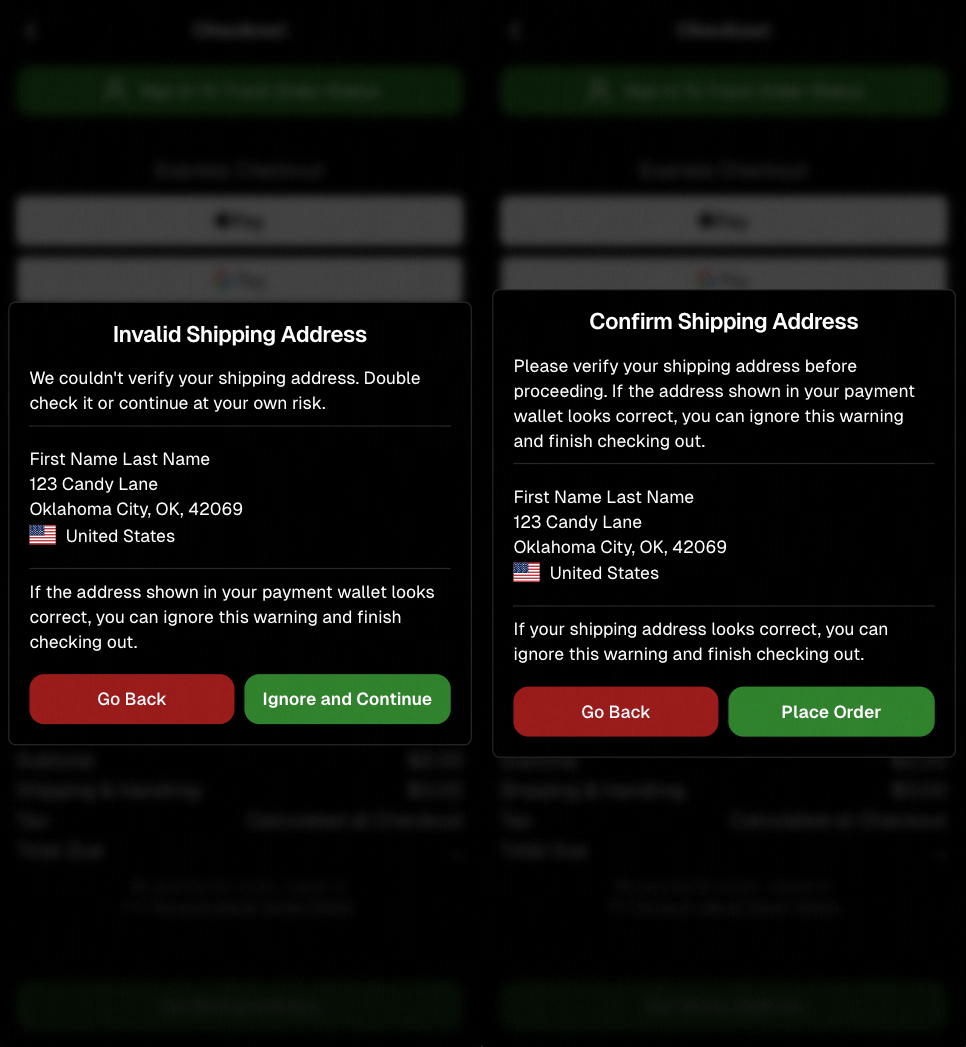
Confirmation popup now clearly displays shipping address confirmation.

🧠 Better UI + performance improvements

  • Improved local rendering (performance, memory usage, and task handling) — originally aimed to improve the retail experience on low-end devices, but it should make most devices feel faster!

  • Native “leave page” confirmation on supported browsers/devices (desktop + Samsung back button) when navigating away from an event page (refresh/back).
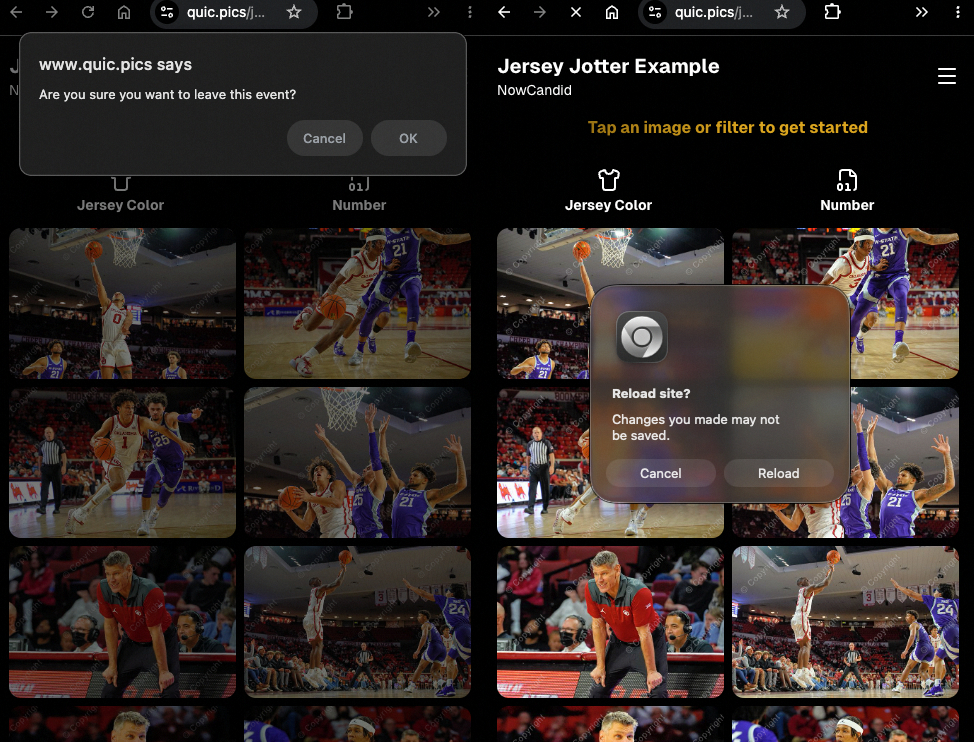
Leave page confirmation

🖼️ Clearer package download expectations + better pickers

  • Personal Gallery Downloads on store sheet and package editor now show “+X Images” in the configurator when there are more than 4 images—so customers don’t think they only get what’s previewed.
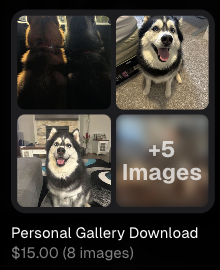
Personal Gallery Download "+X Images"

    • Personal Gallery Download products inside packages can now be clicked to preview contents.

    • Desktop product/package image pickers are now two columns (like mobile), allowing larger image preview during selection.
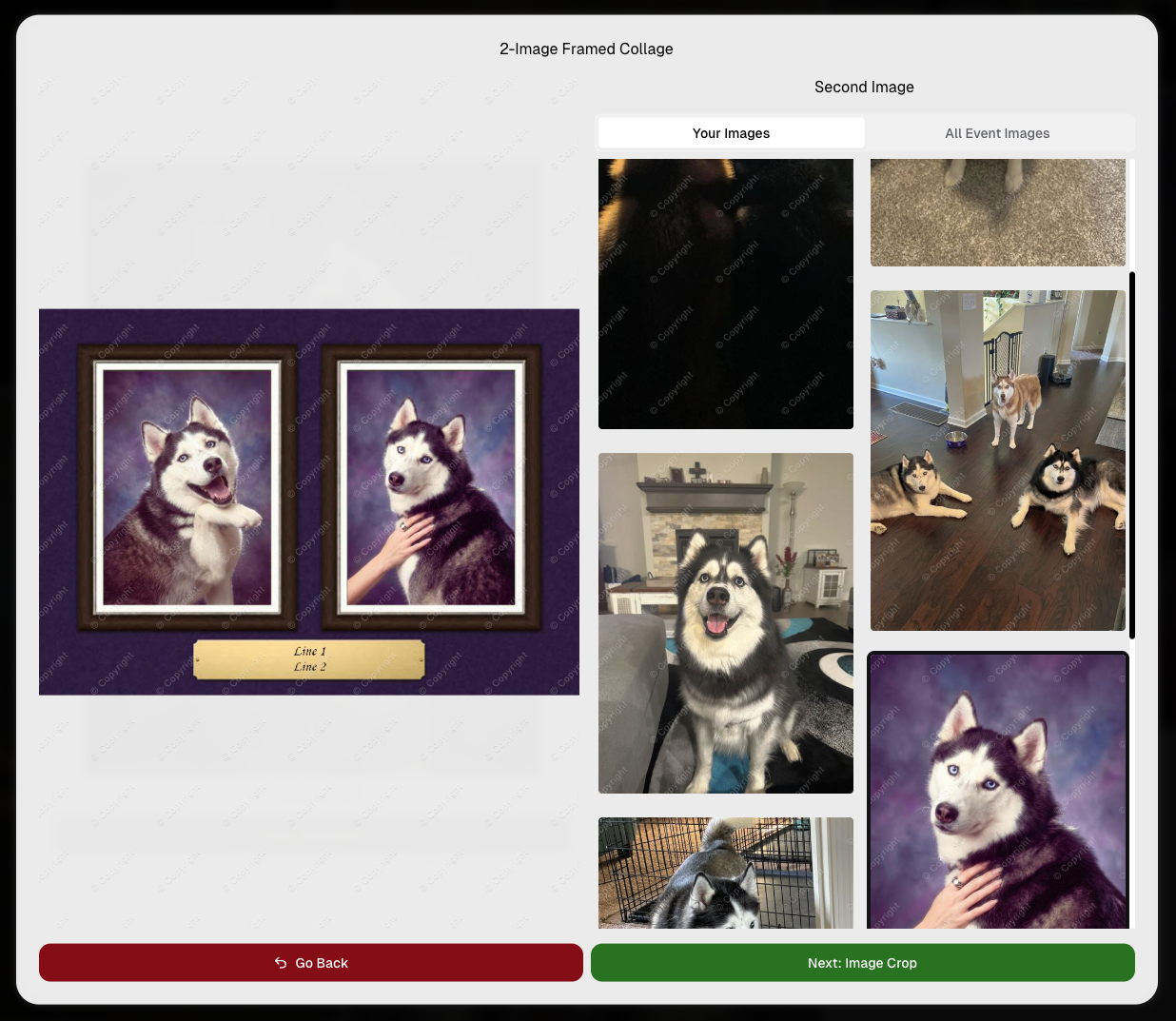
    Larger two column image previews

      • Image Filters landing popup now includes “Browse all photos without a filter” so customers who think they must pick a filter know they can also just browse!
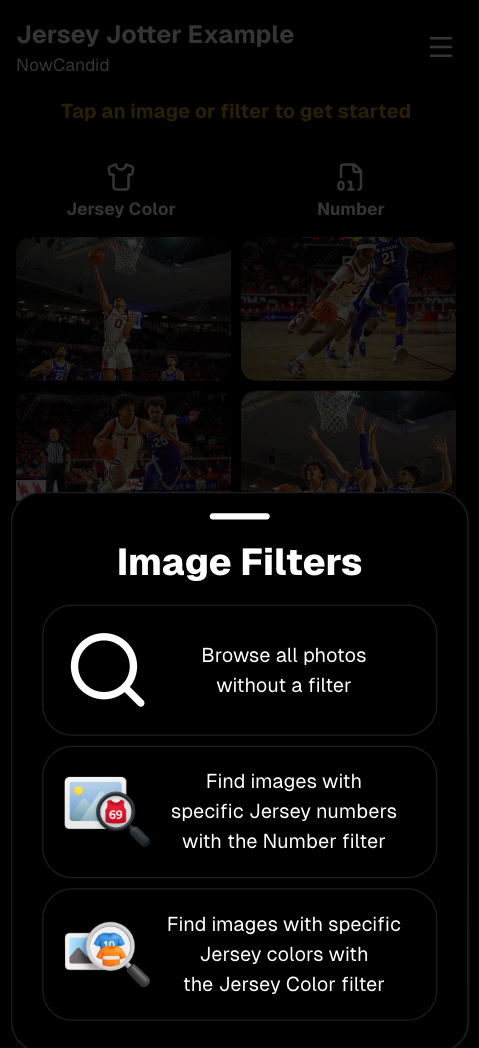
      Image Filters landing popup

      🧩 Retail fixes worth noting

      • Fixed a slashed discount amount showing on week 3 when there is no higher amount.
      • Fixed a GalleryGuard edge case that could close the retail site on some Android devices that support mobile context menus when long-pressing.
      • Fixed a race condition where a Group-by-Face gallery loaded from URL params could show default results instead of the filtered view.
      • Fixed an edge case where manually assigned images marked as group could behave like non-group images on retail.

      📱 Capture App OTA: 5.6.1 & 5.6.2 (iOS & Android)

      🌐 NEW: Network Speed Test (5.6.1)

      A new Network Speed Test button is available in Resources. Tap Run Test to check download speed, upload speed, and latency to NowCandid servers (so results may differ from Google/Ookla). It’s a quick test (downloads 5 MB, uploads 2 MB) and is useful for diagnosing weak or congested service during events.

      Mbps is a standard measurement for connection speeds, and 1 megabit per second (Mbps) is 0.125 Megabytes per second (MB/s). So 8 Mbps is 1 Megabyte per second, max. For example, with images that are 10 Megabytes in size, a speed of 8 Mbps would take a minimum of 10 seconds to upload. When speeds are very slow, image uploads may be impossible due to uploads timing out and restarting. In these cases, open the app when you have a stronger connection and all your images will start going up!
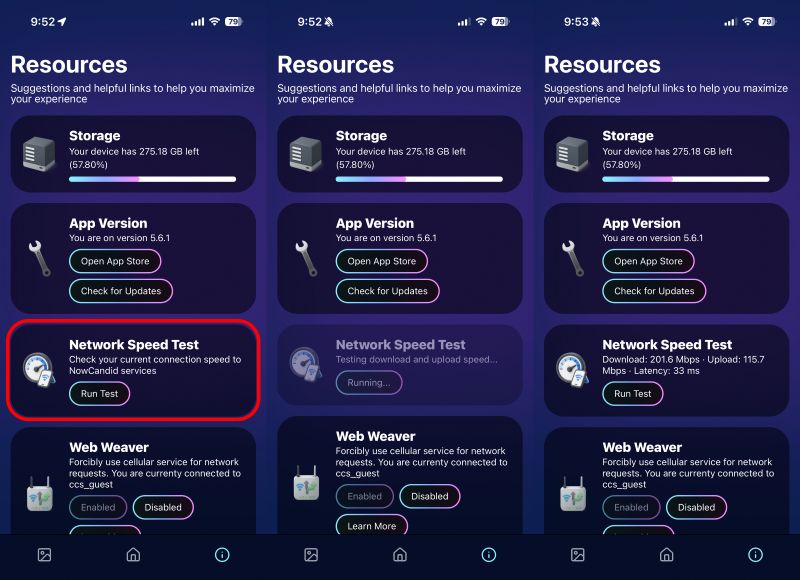
      Network Speed Test

      🎪 Photo Booth + Selfie Check-In Station UI upgrades (5.6.2)

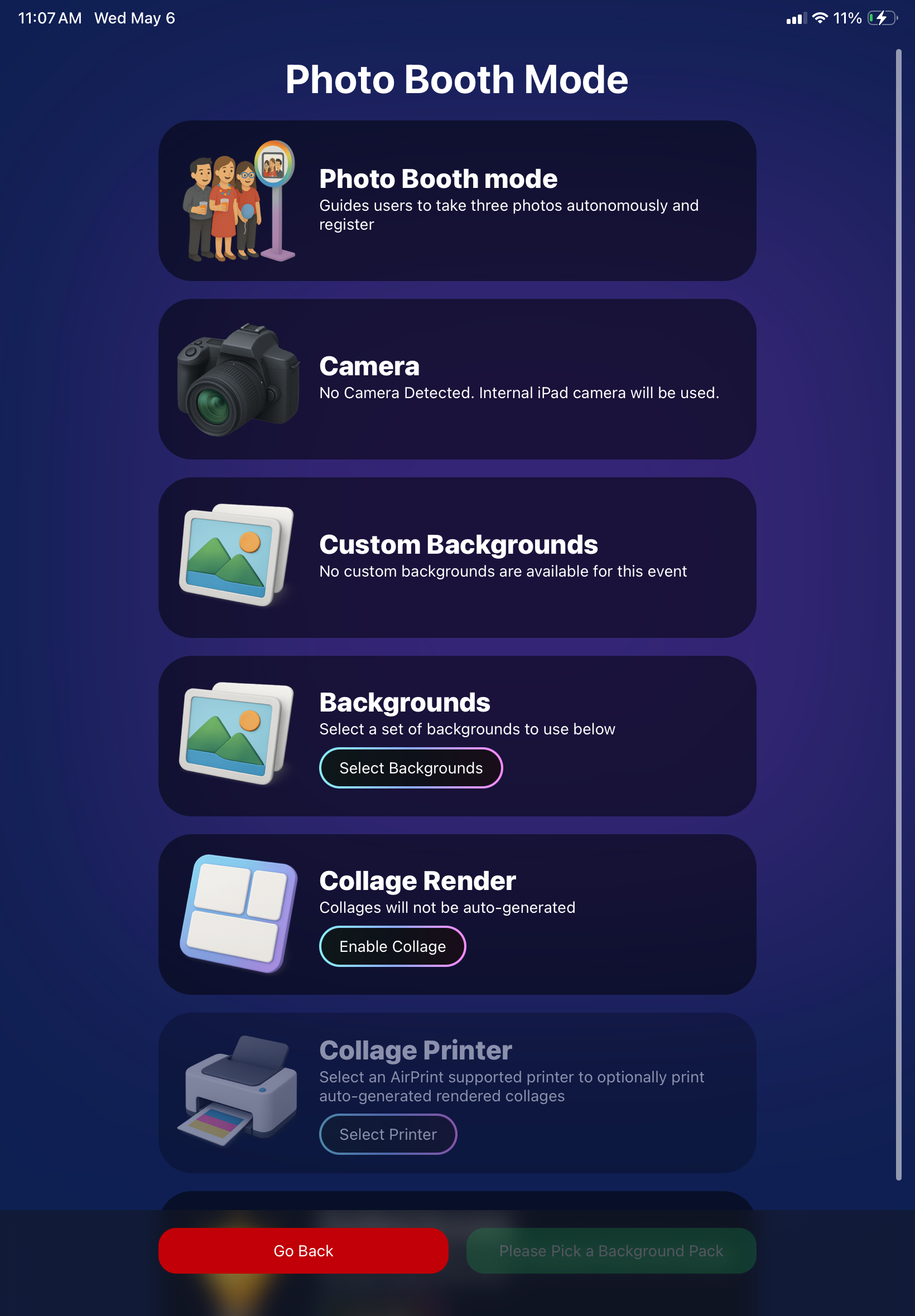
      • Photo Booth landing page updated to be more user-friendly (always-visible scrollbar, updated text, sticky go back/continue buttons, red/green emphasis, and a popup explaining why Continue is greyed out).
      • Selfie Check-In Station landing page updated with red/green Go Back / Begin buttons.
      • New dropdown icon beside Group Photo toggle (when an event has PhotoTags) to better display there are additional options to assign PhotoTags.
      • Fixed edge case cancel/continue behavior on Selfie Check-In Station when no contact info was entered.
      🧩 NEW: Lightroom Classic Plugin (Official)

      We’ve launched an official Lightroom Classic plugin to upload images to NowCandid events directly from Lightroom Classic.

      Key notes:

      • Lightroom Classic only
      • Same image rules apply (color profile, DPI, etc.)
      • Uses Capture App login
      • Only events within 60 days of event start date show in the selector
      • Image Details → Logs will show “Uploaded from NowCandid Lightroom Plugin”
      • Docs include guide/download/installation: https://app.nowcandid.com/docs/tools-more/lightroom
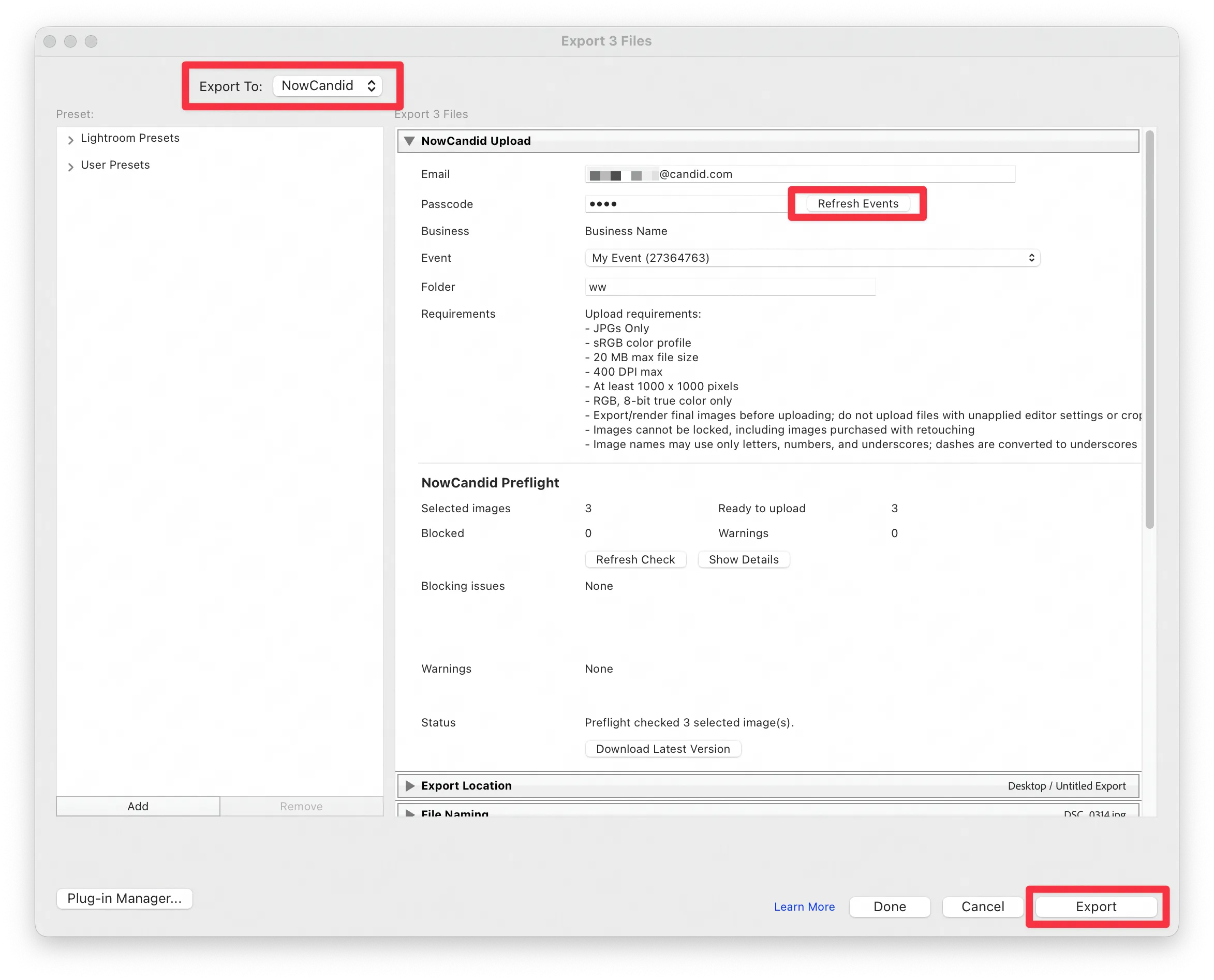
      Lightroom Classic Plugin

      Upload from NowCandid Lightroom Plugin

      🖥️ Dashboard: Upload & Roster Clarity + Small UX Wins

      • Event roster upload and PhotoRoster upload now warn about every unrecognized column, making it easier to spot misspellings (especially for optional columns).
      • Participant list page download now puts additional contacts into columns instead of rows.
      • Participant list download now puts merged contacts into their own row if they have different first/last names.
      • Image upload naming cleanup:
        • spaces/parentheses now automatically become underscores (e.g., Image (2)Image_2)
        • names ending in z now get a trailing underscore (e.g., ImagezImagez_)
      • Candy got even better at using the new Docs for responses.
      • Password reset now shows a clear “Your link has expired” screen (links expire after 24 hours).
      • Fixed participant filter inside another participant’s manual assign/unassign page not working properly.
      • Participant Details PhotoTag assignment UI: merged participants no longer incorrectly show PhotoTags as assigned.
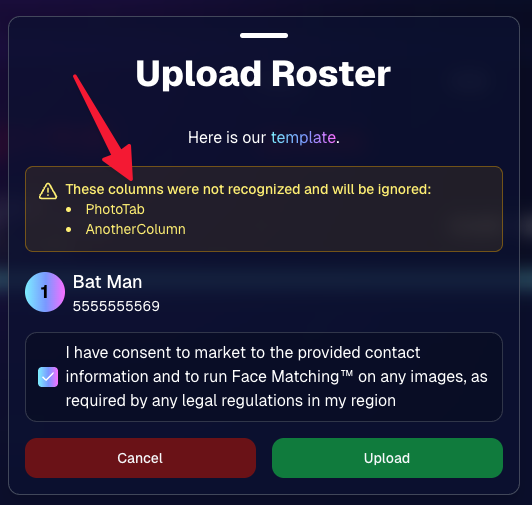
      Upload Roster now warns about every unrecognized column.

      📣 Marketing Fixes

      • Fixed edge cases where galleries that were only AI-edited images could cause follow-up email marketing issues and show as 0 images on Participant List.
      • Fixed Day0 marketing edge case not starting if gallery is just AI-edited images.
      • SMS gallery links now include “View photos:” before the gallery URL to reduce confusion where some users thought the gallery link was an unsubscribe link.

      That’s the week! 💫

      Between the Lightroom Classic plugin, the Capture App’s new Network Speed Test, and retail improvements that reduce confusion (and improve performance), this week was packed with practical wins you’ll feel right away.

      Keep it sparkly,

      Candy

      Related articles

      Weekly Recap: New Ornaments, Better Marketing History & Big Windows Capture App Update 🎄📸
      Feature Updates
      November 14, 2025

      Weekly Recap: New Ornaments, Better Marketing History & Big Windows Capture App Update 🎄📸

      5
       minutes read
      Hey photo friends! 👋


      Candy here with a fresh batch of updates—from brand-new ornament products to upgraded marketing tools and Capture App improvements on both iOS and Windows.

      Let’s jump in!

      🎁 New Holiday Ornaments

      • 🎄 Statuette Ornament

        A new hanging statuette-style ornament—complete with a red ribbon.
        • Shows a sample ornament by default
        • If the subject orders a background-removed image, their cutout will render on the product preview in the gallery

      • 🪙 Aluminum Ornament

        A flat aluminum ornament that renders any photo in the product gallery.
        • Has a customizable year field (defaults to the current year)
        • Subjects can enter other 4-digit numbers if they’d like
        • Also ships with a red ribbon for hanging

      Perfect timing for holiday sales. 🎅

      ✉️ Marketing History & Dashboard Improvements

      📬 Marketing History Page (Big Upgrade!)

      • 🧭 Pagination for easier navigation through large histories
      • 👤 Shows participant name + image on each row
      • 🔗 Click through to the Participant directly
      • 🧾 All email + text sends are now in one combined, date-sorted list
      • ⚡ Faster initial load, and smoother scrolling for long histories
      • 🔍 New filters:
        • Text search (with CMD+F support)
        • Filter to Texts only or Emails only
        • URL supports both filters and pagination, so you can share filtered views

      🖥️ Other Dashboard Updates

      • 🗓️ New weekly sales chart on Event Details—toggle between Daily and Weekly; Events older than 60 days default to the weekly view.
      • 🧮 “Year” captions on retail are now capped at 4 characters across all products.
      • 🌄 Download custom backgrounds you’ve uploaded for an Offer
        • Offer → Select Backgrounds → My Custom Backgrounds → Download button
      • 💬 FreePics send error reason now appears on Participant Details (logging started April 2025).
      • 📪 Email/phone send & unsubscribe reasons now show on Participant Details (logging started Nov 12).
      • 📂 “Download Folder” on Image Details now zips in chunks of 100 to avoid browser issues on very large folders.

      🧹 Small Dashboard Fixes

      • 🗓️ Removed Day 6 text from all three FreePics programs (it wasn’t adding clicks or sales).
      • 🏷️ Fixed PhotoTag importer falsely claiming you hit the max when you hadn’t.
      • 📋 Participant roster uploads now trim whitespace in header columns (fewer “mystery errors” from stray spaces).
      • 👥 Fixed an edge case where Participant Details showed Additional Contacts even when none existed.

      📱 Capture App iOS 4.21.4 (OTA)

      • 🤳 Front camera photos mirrored

        Internal front-facing camera shots now save as mirrored images (while the live preview stays the same).
        • Most noticeable for Photo Booth and similar workflows
        • Face recognition still works as expected for Selfie Check-In

      (If you’re on 4.21 already, this will arrive as an over-the-air update.)

      💻 Capture App Windows 4.20 Highlights

      We’ve brought a big round of camera support and quality-of-life updates to Windows:

      • 📷 Broader camera support
        • Sony now works on ARM tablets, and most new Sonys no longer require special driver setup—just plug in.
        • Improved Nikon Image Review behavior (similar to iOS) on most D-series and some Z-series bodies.
        • Added support for Panasonic cameras.
        • Added support for a wide range of FUJIFILM X and GFX models.
        • New Canon support: EOS R5 Mark II, EOS R1, EOS R50V.
      • 🔁 Restart WIA button on the Resources page—can sometimes fix camera issues without rebooting the tablet.
      • ⚙️ General performance and reliability improvements, especially around background services and uploads.
      • 🎨 Updated app icon & name to match the iOS version.

      That’s it for this week!

      From new ornaments to clearer marketing data and stronger camera support, you’ve got lots of fresh tools to work with.

      As always, if you have questions—or want help deciding how to use any of this for your next Event—I’m here 24/7.

      Keep creating magic,

      Candy 🍬

      Weekly Recap: Capture App 4.21 OTA, New Dashboard Filters & Helpful Fixes 📲🧭
      Feature Updates
      November 7, 2025

      Weekly Recap: Capture App 4.21 OTA, New Dashboard Filters & Helpful Fixes 📲🧭

      2
       minutes read
      Hey photo friends! 👋

      Here’s what’s new this week! Changes focused on faster updates, more filters, and a handful of useful fixes.

      📱 Capture & Upload App (iOS) — Version 4.21

      • 🚀 Over-the-Air (OTA) updates: Most app updates no longer require the App Store. Updates download in the background and install on app restart/launch—no interruptions during Events. You can also manually check via Resources → “Check for updates” (tap the (i) button).
      • 📶 See your Wi-Fi name: The current network name now shows on the Web Weaver item in Resources.
      • Faster, lighter uploads: Additional memory and performance improvements when uploading image files.

      Smaller iOS app changes

      • 🖨️ AirPrint prompt returns if a printer isn’t available (avoids an iOS security hiccup).
      • 🌐 Web Weaver manual toggle fixed.
      • 🔎 Image preview UI fixed when switching after zoom/pan.
      • 🧾 Name Lookup now populates correctly on first launch.
      • 🖼️ FreePortraits icon color updated in Event select (those icons are single-color).
      • 🗂️ Block log-ins to flagged TKO folders (e.g., if you flagged “a”, you can’t log into “ac”).
      • ↔️ Horizontal zoom issue on iPhone resolved.

      FYI on versions: The App Store shows 4.21; the current OTA version is 4.21.3. We’ve already shipped three OTAs this week to help teams while they’re still on-site! Pretty cool, right?

      🖥️ Dashboard

      • 👁️ Manage Images → Visibility filter: All / Visible only / Hidden only.
      • 🎯 Assign Images → New filters: Name order, Purchased only, Visibility.
      • 🔗 Events Report: Clicking an Event now opens its Event Details page.

      Smaller dashboard changes

      • 📨 Email campaign guard: Prevents a campaign from starting if the only image is a group PhotoTag.
      • 📥 Inbox UI: On mobile, updated header; on desktop, the selected item area stays sticky while you scroll.
      • 🧰 Trader Card fixes: Two styles now say League (not LD), and one style’s production print now matches the retail render.
      • 🖼️ Art uploader validation: Shows an error if an image is under 100 px in width or height.
      • 😊 Retail face boxes aligned on very small desktop viewports.

      That’s the update for the week!

      Thanks for reading—and happy shooting!

      Candy 🍬

      Weekly Recap: Sticky Filters, Faster Uploads & Happy Halloween! 🎃🕸️
      Feature Updates
      October 31, 2025

      Weekly Recap: Sticky Filters, Faster Uploads & Happy Halloween! 🎃🕸️

      3
       minutes read
      Boo! 👻

      Candy here with a trick-or-treat pail of useful updates: sticky, shareable filters, faster uploads, and clearer participant tools. You’ll keep context when you reload or share links—and move uploads along faster.

      Let’s dig in!

      🖥️ Dashboard Improvements

      • 🧲 Sticky, shareable filters
        Filters now live in the URL on Manage Images, Assign Images, Event List, and Participant List. Refresh or hit Back and your view stays put—and you can share filtered links with teammates or support.
      • 🚀 Faster image uploads
        The Image Upload page handles large batches more efficiently for quicker throughput.

      🪄 Minor Dashboard Tweaks

      • 💳 FreePics Upfront Pay editor is now available in FreePortraits.
      • 🏷️ “Additional Contact” badge appears under a participant’s name for quick clarity.
      • 👥 Additional Contacts list on Participant Details, plus an Add option (when new campaigns are allowed).
      • ✉️ Marketing History filter: view All / Texts / Emails.

      🧹 Dashboard Bug Fixes

      • 🧩 Positive ID code PDFs now show PhotoTags for merged participants even when they weren’t the first registered.
      • 📏 2×5 Positive ID PDF layout fixed for long event titles.
      • 📄 2×5 Positive ID PDF last-page spacing fixed when the page isn’t full of cards.

      📲 Capture & Upload App

      • 🙅 Name Lookup no longer shows Additional Contacts (no app update needed—restart or re-log into the Event).

      🛍️ Misc Changes

      • ⚖️ Retail “weight” caption limit increased to 7 characters (up from 3, for products like trader cards).

      🛠️ Misc Fixes

      • 🔁 FreePics won’t double-text the same image if someone was registered twice in the same send batch.
      • 🔃 Manage Images “uploaded first/last” filter direction corrected.
      • 📪 Fixed an unsubscribe edge case when a gallery is entirely cutouts and all original JPEGs are not visible.

      That’s the update!

      Happy Halloween—and good shooting! 🎃


      Candy 🍬

      __wf_reserved_inherit

      Let’s get in touch

      If you’re a photographer looking to add NowCandid™ services to your wheelhouse, set up a call with us!

      How to customize formatting for each rich text

      How to customize formatting for each rich text

      How to customize formatting for each rich text

      How to customize formatting for each rich text

      How to customize formatting for each rich text
      How to customize formatting for each rich text

      What’s a Rich Text element?

      The rich text element allows you to create and format headings, paragraphs, blockquotes, images, and video all in one place instead of having to add and format them individually. Just double-click and easily create content.

      A rich text element can be used with static or dynamic content. For static content, just drop it into any page and begin editing. For dynamic content, add a rich text field to any collection and then connect a rich text element to that field in the settings panel. Voila!

      Headings, paragraphs, blockquotes, figures, images, and figure captions can all be styled after a class is added to the rich text element using the "When inside of" nested selector system.

      • List One
      • List Two
      • List Three
      • List Four
      • List Five

      This is a link

      This is bold text