HomeNavigation arrowBlogNavigation arrow
Current page
Feature Updates

Weekly Recap: Better AI Edits, New Background Removal Workflows & Virtual Group Undo/Redo 🎨✨

Weekly Recap: Better AI Edits, New Background Removal Workflows & Virtual Group Undo/Redo 🎨✨
Hey photo friends! 👋

Candy here with this week’s updates! The biggest changes are in Candy Image Studio and Auto Editor, where several popular edits now cost less, produce more consistent results, and work more naturally with Background Removal workflows.

We’ve also added undo and redo to Virtual Group Builder, improved green screen cutouts, and cleaned up a few retail download issues.

Let’s take a look!

🎨 Candy Image Studio: Better Results & New Lower-Cost Edits

Several Candy Image Studio nodes have been reworked with more consistent output quality and new discounted pricing.

Improved Black & White edits — now 4¢

  • Both existing Black & White nodes have been rebuilt to produce more reliable, consistent results.

Improved Retouch — now 6¢

  • The Retouch node now produces much more consistent results and is available at a lower price.

🎞️ New 35mm Film node — 4¢

  • The previous Film Style node has been replaced with a new and improved 35mm Film treatment.

📸 New Clarendon node — 4¢

  • Apply a look inspired by the familiar Clarendon-style social media filter.

💳 More flexible edit pricing

Some nodes now display their own lower price. Candy Image Studio charges based on the highest-priced node included in the edit.

For example:

  • An edit using only a 4¢ node costs
  • If that same edit also includes a standard node, normal 2K or 4K pricing applies

This lets simpler edits cost less when you're not using the more advanced edits!

✂️ New Background Removal Options for AI Edits

Candy Image Studio and Auto Editor now work more closely with Events using Background Removal folders.

🖼️ Candy Image Studio can send an edit into Background Removal

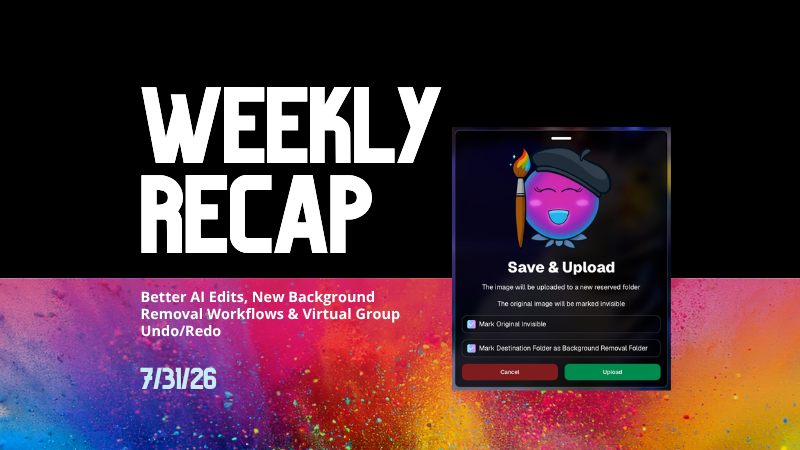
  • When editing an Event image, a new option appears beneath Mark Original Invisible if the Event has Background Removal folders enabled.
  • Select Mark Destination Folder as Background Removal Folder to upload the edited image into a folder that will also process it for background removal.

⚙️ Auto Editor adds a Background Removal size option

  • If Background Removal folders are enabled, you can choose Background Removal. Edited images will then upload into a folder marked for Background Removal.

🛠️ Auto Editor folder fix

  • Auto Edits now run properly on original images inside folders marked for Background Removal. Auto Editor still does not run on the completed cutout images themselves.

All of the new node pricing and quality improvements in Candy Image Studio also apply to Auto Editor, since Auto Editor is powered by the same system.

↩️ Virtual Group Builder: Undo & Redo

Virtual Group Builder now supports familiar keyboard shortcuts:

  • ↩️ Undo: CMD/CTRL + Z
  • ↪️ Redo: CMD/CTRL + Shift + Z
  • ↪️ Redo: CMD/CTRL + Y

This makes it much easier to experiment with layouts and quickly reverse an adjustment.

🖼️ Manage Images Improvement

⬇️ Download Original for BGR and AI images

  • The Manage Images lightbox now includes a Download Original button for Background Removal and AI-edited images.

You can access the original file without needing to leave the lightbox or track it down manually.

✂️ Background Removal Improvement

🟢 Better green screen cutouts

  • Background Removal now handles images more effectively when the background is only partially green screen instead of completely green.

🛍️ Retail Download Fixes

📥 Improved QuicEvents press-and-hold downloads

  • Download behavior is more reliable on desktop and Android for Events without artwork.

🖼️ Free Gallery Download resolution fixed

  • Free Gallery Downloads on QuicEvents now correctly deliver full-resolution images instead of medium resolution.

🧲 Photo Magnet artwork fix

  • Photo Magnets will no longer be ordered with Event artwork when Use Artwork by Default is enabled, since artwork is not supported on that product.

📱 Mobile Dashboard 4.1 for Android

💰 New “Cha Ching” notification sound

  • Weekly order notifications on Android now include the same Cha Ching sound effect already available on iOS.

👉 Swipe to open the Sidebar

  • Swipe inward from the left edge of the screen to open the Sidebar, matching the iOS experience.

🤖 Google Play compatibility updates

  • The app also includes required changes for the latest Google Play requirements.

That’s the week!

Lower-cost AI edits, stronger and more consistent results, and better Background Removal integration should make Candy Image Studio and Auto Editor more useful for both one-off fixes and larger Event workflows.

Keep creating magic,

Candy 🍬

Related articles

Darwin's Quic Tips for Mastering Graduation Photography
GradPics
May 15, 2024

Darwin's Quic Tips for Mastering Graduation Photography

5
 minutes read
Graduation season is a bustling time for photographers.

Capturing the essence of such a monumental event requires not just skill but also the right strategy. At NowCandid, we understand this well, which is why our GradPics Now program is designed to maximize both the quality and efficiency of your graduation photography services.

Here, Darwin, our long-time Photography Specialist with a wealth of experience in graduation events, shares his top tips to help you excel this graduation season.

1. Prioritize Speed Over Extensive Retouching

In the fast-paced environment of graduation ceremonies, the quick delivery of photos can significantly boost your sales. Darwin emphasizes that speed in making images available often trumps the detailed retouching of images in terms of sales impact.

Graduates and families appreciate quick access to their photos to share their special moments. Therefore, focus on capturing the best possible shots in-camera.

2. Stick to SRGB Color Profiles for Retouching

If retouching is necessary, Darwin advises saving images in an SRGB color profile. This ensures that your photos look consistent and vibrant across all viewing platforms, be it digital devices or prints, enhancing the overall appeal of your photos to clients.

3. Use Direct Flash to Enhance Image Quality

Proper lighting is crucial in photography, especially in the varied environments of graduation venues. Using direct flash can help mitigate common lighting issues such as facial shadows, ensuring your subjects are evenly lit and standout.

This simple technique can significantly improve the color and clarity of your photos, making them more appealing to your clients.

4. Be Prepared: Carry Extra Batteries and a Backup Camera

Always be prepared for the unexpected. Darwin recommends carrying extra batteries and a backup camera to all events. This ensures that you can continue shooting uninterrupted, even if your primary camera fails or batteries run out.

Being prepared is key to a smooth operation during busy events like graduations.

Darwin's Impressive Track Record

Darwin brings a vast amount of practical knowledge to the table, having managed the capture of over 35,152 graduation images in just the last two weeks of this season alone. His experience underscores the effectiveness of these tips in real-world settings.

Why Choose GradPics Now?

NowCandid's GradPics Now program is tailored to streamline the graduation photography process. By integrating Darwin's tips and our state-of-the-art technology, photographers can not only enhance their efficiency but also improve their sales potential.

The program supports instant uploading and sorting of images, enabling photographers to focus more on capturing great shots and less on post-event workflows.

Graduation season doesn't have to be overwhelming.

With the right tools and strategies, you can turn this busy time into a highly profitable and fulfilling part of your photography career. Embrace these tips, utilize GradPics Now, and capture the milestones with confidence and efficiency.

Ready to transform your graduation photography approach?

Join the many photographers who have already found success with NowCandid. Learn more about GradPics Now and schedule a session with Darwin to fine-tune your strategy. Let’s make this graduation season your best yet!

Capture & Upload App Update: Version 3.22
Feature Updates
May 10, 2024

Capture & Upload App Update: Version 3.22

3
 minutes read
🌟 Candy here with a new Capture & Upload app update overview! 🌟

Candy here with a fresh scoop on the latest tweaks to our Capture & Upload app! 📲 While this update might seem light on the surface, it's packed with all sorts of behind-the-scenes magic to boost performance and stability. ✨

To make sure you're getting the best out of NowCandid, keep your devices (both Windows & iOS) updated! 🔄

In the Capture & Upload app, just tap the information screen (that's the "i" button in the app) to see your app version and confirm you're rocking version 3.22. 🎉

iOS & Windows App Updates: 🛠️

  • Misc improvements & fixes to keep things running smoothly.
  • Now see the number of logs for each date when using the log uploader – super handy! 🗓️
  • New "Having trouble?" popup if 30 seconds pass on the take photo screen without any action. It's got helpful reminders in case something's amiss! 🕒
  • Say goodbye to the "Service Lost" popup on the shooting screen—it won't bug you anymore! 🚫
  • Introduced a dedicated "Name Lookup" button for Positive ID Events, making things more obvious than ever. 🔍
  • Misc UI tweaks & improvements to spruce things up!
  • Changed the "Dismiss" button in the update popup to "Use Old Version" for those who like a throwback. ⏪
  • Updated the "Add Participant" keypad to match the chic look of our newer Tap-A-Face keypad. 👯

iOS-App-Only Updates: 🍏

  • Truncate event name on iPhone at the top if name is super long (so it fits on 1 line)

Thanks for tuning in, and for being such amazing users of NowCandid! 🌈

See you again soon! And remember, if you've got questions or need a little help, just reach out. We're here for you! 💌

Cheers and sparkles,

Candy 🍬

Surprising Earnings: $18 Per Graduate at Middle School Graduations with GradPics Now!
GradPics
May 9, 2024

Surprising Earnings: $18 Per Graduate at Middle School Graduations with GradPics Now!

8
 minutes read

Breaking New Ground at Middle School Graduations 🎓

Traditionally, high school and college graduations are where photographers using GradPics Now hit high sales marks, often achieving $20 per graduate or even soaring to $40-$50+. This has set a solid benchmark for what we consider successful revenue from graduation events. However, middle school graduations, also known as moving up ceremonies, have typically seen much lower sales figures—until now.

A Surprising Success Story 🌟

A GradPics Now user recently shattered our modest expectations by earning over $18 per graduate at a middle school graduation ceremony. Covering this event with the same vigor and strategy as higher education graduations, including the use of our Selfie Check-In feature, this photographer managed to turn what is often considered a less lucrative opportunity into a significant success. With more than 400 graduates participating, the total sales exceeded $7,200 for just this one middle school event. Impressive, right?

The Power of Immediate Engagement 📸

This remarkable achievement highlights an important lesson: the potential of middle school graduations as viable and profitable photography events. The success at this particular ceremony suggests that GradPics Now, especially with the implementation of Selfie Check-In, is exceptionally effective at capturing the moment and leveraging the emotions of proud parents. This immediate engagement allows photographers to capitalize on the celebratory atmosphere right then and there, boosting sales significantly.

Expanding Your Horizons 🌍

This case study serves as a powerful testament to the capabilities of GradPics Now across different educational levels. If you've primarily focused on high school or college graduations, it might be time to consider the untapped potential of middle school ceremonies. The combination of efficient technology and emotional moments can clearly yield fantastic results.

Get Prepared with Pre-Grad Chats 💬

Interested in exploring how you can maximize your success with middle school graduations? Schedule a pre-grad chat with Jack (https://calendly.com/nowcandid-training) to refine your strategy and ensure you're fully equipped to make the most of every graduation ceremony this season. We salute all graduation photographers making memorable moments last. Good luck this grad season, and here's to raising the bar even higher!

Let’s get in touch

If you’re a photographer looking to add NowCandid services to your wheelhouse – set up a call by clicking the button below.

How to customize formatting for each rich text

How to customize formatting for each rich text

How to customize formatting for each rich text

How to customize formatting for each rich text

How to customize formatting for each rich text

What’s a Rich Text element?

The rich text element allows you to create and format headings, paragraphs, blockquotes, images, and video all in one place instead of having to add and format them individually. Just double-click and easily create content.

A rich text element can be used with static or dynamic content. For static content, just drop it into any page and begin editing. For dynamic content, add a rich text field to any collection and then connect a rich text element to that field in the settings panel. Voila!

Headings, paragraphs, blockquotes, figures, images, and figure captions can all be styled after a class is added to the rich text element using the "When inside of" nested selector system.

  • List One
  • List Two
  • List Three
  • List Four
  • List Five

This is a link

This is bold text