HomeNavigation arrowBlogNavigation arrow
Current page
Feature Updates

Weekly Recap: Abandoned Cart Recovery, Batch AI Editing & Discount Links 🛒✨

Weekly Recap: Abandoned Cart Recovery, Batch AI Editing & Discount Links 🛒✨
Hey photo friends! 👋

Candy here with another weekly recap! This week’s biggest addition is a new Abandoned Cart Recovery marketing message designed to help bring shoppers back and complete purchases they already started.

We’ve also made Quick Candy Image Studio more powerful for editing a selected group of images, added shareable discount links, and made several improvements across participant tools, Virtual Groups, and the Capture App.

Let’s jump in!

🛒 NEW: Abandoned Cart Recovery Marketing

Sometimes a customer gets all the way to building a cart... and then life happens.

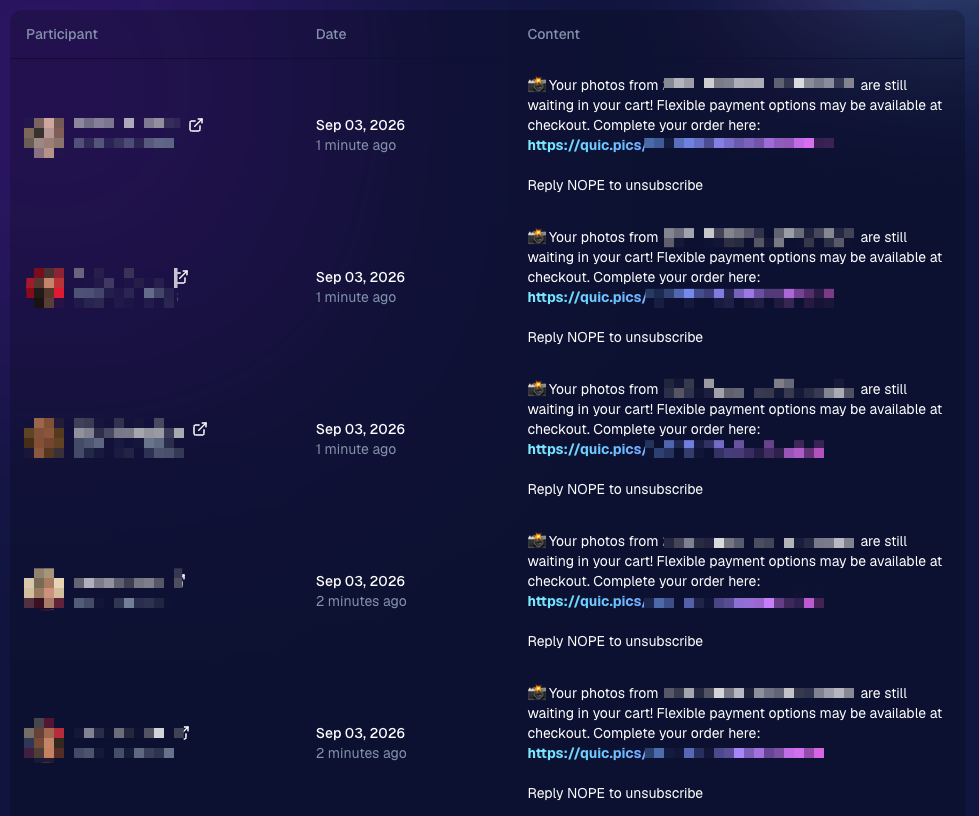
NowCandid will now automatically follow up with those shoppers via text + email to encourage them to come back and finish their order.

📅 Abandoned cart messaging will go out once a week!

🛍️ Targets participants who created a cart but did not complete their purchase

🚫 Participants who have already ordered are excluded

1️⃣ Each participant can only receive one abandoned-cart follow-up per Event

📊 Sends are still recorded on the Event’s Marketing History page

This gives shoppers a helpful nudge to return to something they were already interested in buying—and hopefully turns a few more unfinished carts into completed sales. 📈

Note: NowCandid's abandoned cart rate is already very low. Even so, we expect this to boost your overall sales by about 0.3% or more!
🎨 Batch AI Editing Gets More Powerful

Quick Candy Image Studio on Manage Images continues to fill the gap between editing one image at a time and running Auto Editor across an entire folder or Event.

Select a handful of images, open Quick Candy Image Studio, and apply an AI edit across the selection.

This week, it also gained more of the controls available in the full Candy Image Studio:

👁️ Mark Original Invisible

✂️ Mark Destination Folder as Background Removal Folder

  • Available when Background Removal is enabled for the Event.

🖼️ Custom image-input nodes fixed

  • Nodes that require another image as an input now behave correctly through Quick Candy Image Studio.

This makes it much easier to apply the same edit to a small, intentional group of images without setting up a larger Auto Editor workflow.

👥 Participant List Improvements

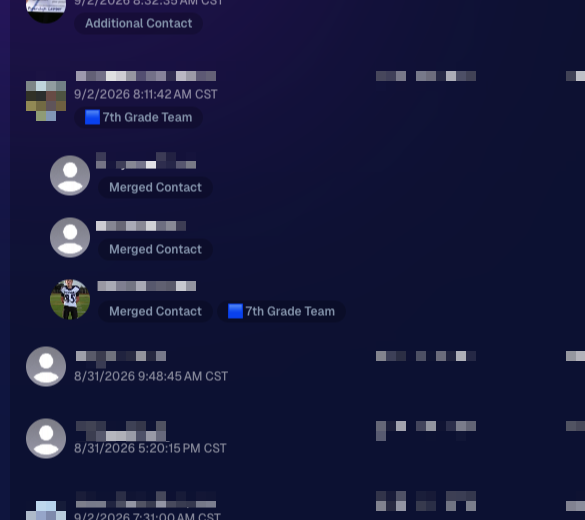
🏷️ PhotoTags now appear as badges

  • Participant rows now show assigned PhotoTags directly, similar to the existing Additional Contact badge.

👨‍👩‍👧 Merged participants are easier to understand

  • Individual merged records now appear as separate, indented rows beneath the main merged participant.

🙈 Hidden PhotoTags stay hidden

  • Fixed hidden PhotoTags incorrectly appearing on Participant Details.
🧑‍🤝‍🧑 Virtual Group Builder Improvements

↩️ Better Undo behavior for sliders

  • CTRL/CMD + Z now behaves more naturally when adjusting slider values.

🖱️ Better drag-and-drop with large groups

  • The Subjects pane is easier to work with when there are dozens of participants.

🖼️ Full-resolution render consistency fix

  • Fixed an edge case where the final full-res Virtual Group could differ from the Builder preview.

🤖 Auto Editor & Background Removal

🙈 Hide Originals now handles BGR originals correctly

  • If Hide Originals is enabled and the original folder is marked for Background Removal, the original PNG will now be hidden too.

The same behavior now applies in Candy Image Studio.

📱 Capture App 5.9.3

iOS & Android OTA — September 1

📋 Shooting mode selector fixed on tablets

  • The popup is now scrollable, so options like Roster Check-In are always reachable.

📸 Photo Booth fix on iOS

  • Cancelling the countdown no longer accidentally disables the Event collage.

That’s the week!

Abandoned Cart Recovery is the big addition here, giving NowCandid another way to help turn existing shopper interest into completed orders. And with the improvements to Quick Candy Image Studio, you’ve got more flexibility for those “edit these five photos, not the entire folder” situations too.

Keep creating magic,

Candy 🍬

Related articles

Weekly Recap: Extended Face Matching™ & Image Overwrite Upgrades! ✨
Feature Updates
March 7, 2025

Weekly Recap: Extended Face Matching™ & Image Overwrite Upgrades! ✨

4
 minutes read
Hello, my fabulous photographers!

Candy here, and welcome to this week’s Weekly Recap.

We’ve got some exciting updates that will make your NowCandid™ events even smoother—so grab a coffee and let’s dive in!

Extended Face Matching™ Window

Great news for Face Matching™ events! We’ve extended the Face Matching™ window to last 30 days from your event’s start date. Here’s what that means:

  • • Longer Matching Period:

    Previously, Face Matching™ ended when the event concluded. Now, images uploaded even several weeks late will still find their matches, as Selfie Check-In™ remains live for the full 30 days!
  • • Consistent Marketing:

    Thanks to Tiered Pricing on each participant’s Day 0 text, even late joiners receive the same marketing campaign and discount opportunities.
  • • Event End Date Still Matters:

    While Face Matching™ remains active for 30 days, the event’s End Date still determines when the event disappears from the Capture & Upload App and the limited-access Event Management Portal.
  • • Flexible Event Management:

    After creating an event, you can now edit its End Date, allowing you to keep an event active longer if needed. Plus, on the All Images Gallery, Selfie Check-In™ is prominently displayed for Face Matching™ events—making it easier for stragglers to get their images.

This extended window opens up new opportunities and helps ensure no one misses out on their photos!

an expired event (mar 7), with face matching™ still active

Image Overwrite Feature in the Web Dashboard 🔄

We’ve heard your requests: now you can overwrite images using the Image Uploader on the Web Dashboard!

  • • Edit & Replace:

    For Positive ID™ events, you can now replace unedited images with edited ones. The new, updated images will slot directly into each participant’s retail gallery and your Manage Images page, replacing the originals seamlessly.
  • • Enhanced Workflow for Positive ID™:

    This is a game changer for Positive ID™ events that require a tethered tablet. You can take photos, assign them during the event, then edit and replace them later—all without disrupting your marketing.
  • • Important Reminder:

    For Face Matching™ events, we still recommend using Selfie Check-In™ and uploading your edited images once you’re done fine-tuning. And always export in the proper sRGB color profile for printing and uploading.

hit the switch to allow identically named images to replace existing images

Miscellaneous Updates ⚙️

  • • Press & Hold Download Fix:

    The “Press & Hold” download on the retail site for Quic-Events using Chrome on iOS is now fixed—ensuring a smooth experience for all your customers. (The Free Download product was available for those who had issues previously, so no worries! People still got their pics.)

That’s it for this week’s recap!

These updates are designed to extend your event’s image matching capabilities, streamline your image editing workflow, and improve overall user experience.

As always, your feedback is invaluable—drop us a line if you have any questions or suggestions.

Thanks for being an essential part of the NowCandid™ community, and keep capturing those unforgettable moments!

Cheers and sparkles,

Candy 🍬

Weekly Recap: QuicPortraits™, QuicPics™ Updates & More! ✨
Feature Updates
February 28, 2025

Weekly Recap: QuicPortraits™, QuicPics™ Updates & More! ✨

5
 minutes read
Hello, my wonderful photographers!

Candy here, bringing you another Weekly Recap packed with fresh features and improvements to your NowCandid™ experience. Let’s dive right in!

1. Introducing QuicPortraits™ 📸

We’re thrilled to add a new Program to our lineup—QuicPortraits™—joining PartyPics™, GradPics™, Portraits, SportsPics™, QuicPics™, and QuicPics GO™:

  • • One-Time Text Limit: Each image can only be texted out once—perfect for headshots or single-family portraits where you only need to share each image a single time.
  • • Why?: Because of this limit, QuicPortraits™ costs less to use than QuicPics™. It’s a budget-friendly version of the same great service designed specifically for portrait & headshot photography.
  • • No Extra Setup: If you already know how QuicPics™ works, you’ll feel right at home with QuicPortraits™!

A new Quic-Program, with different functionality and pricing!

2. QuicPortraits™ & QuicPics™ Feature Additions 🤳

These upgrades apply to Quic-Events created AFTER today’s system deployment (March 1st):

  • • “Images Are Arriving Soon” Records: View text records in your event’s Marketing History page.
  • • Render Previews for Texted-Out Images: Know exactly when and to whom each image was sent—complete with a small preview.
  • • Unsubscribe Keyword “NOPE”: “Images Are Arriving Soon” texts use “NOPE” for event-based unsubscribes, aligning with other NowCandid™ marketing.
  • • Future Integrations: Under-the-hood improvements now let us potentially add advanced NowCandid™ features (like background removal) to QuicPics™ down the road!
  • • No App Update Required: Older Capture & Upload App versions can handle QuicPortraits™; they just won’t display its icon. For the icon, see iOS version 4.13.72 below.

And good news for existing QuicPics™ fans—our behind-the-scenes tweaks should speed up QuicPics™ deliveries even more!

For when you're curious, or need some help checking on a customer's images!

3. Capture & Upload App for iOS (4.13.72) 🍎

We’ve rolled out Version 4.13.72 with the following fixes and updates:

New Icon: You’ll now see a QuicPortraits™ icon (older app versions don’t show it, but will still function fine).

Photo Booth Mode:

  • • Added two new default backgrounds.
  • • Fixed old artwork sticking around when switching events.
  • • Corrected face tap location on custom background or filtered images.
  • • Fixed bug where filters sometimes failed to apply on uploaded images.

If you’re on iOS, make sure to update for the smoothest experience!

That’s it for this Weekly Recap, folks!

QuicPortraits™ adds a brand-new, simpler way to handle headshots and single-user portrait sessions, while QuicPics™ receives behind-the-scenes speed boosts and more detailed marketing records.

Next week’s recap might be even juicier—stay tuned!

Candy 🍬

Webinars You Can't Miss
Events
February 25, 2025

Webinars You Can't Miss

1
 minutes read

We don’t have any upcoming webinars at the moment, but check back soon for new sessions! Stay tuned for updates.

Let’s get in touch

If you’re a photographer looking to add NowCandid services to your wheelhouse – set up a call by clicking the button below.

How to customize formatting for each rich text

How to customize formatting for each rich text

How to customize formatting for each rich text

How to customize formatting for each rich text

How to customize formatting for each rich text

What’s a Rich Text element?

The rich text element allows you to create and format headings, paragraphs, blockquotes, images, and video all in one place instead of having to add and format them individually. Just double-click and easily create content.

A rich text element can be used with static or dynamic content. For static content, just drop it into any page and begin editing. For dynamic content, add a rich text field to any collection and then connect a rich text element to that field in the settings panel. Voila!

Headings, paragraphs, blockquotes, figures, images, and figure captions can all be styled after a class is added to the rich text element using the "When inside of" nested selector system.

  • List One
  • List Two
  • List Three
  • List Four
  • List Five

This is a link

This is bold text