HomeNavigation arrowBlogNavigation arrow
Current page
FreePics

QuicPics Is Becoming FreePics! 📸✨ Here’s What’s Changing:

QuicPics Is Becoming FreePics! 📸✨ Here’s What’s Changing:
You may notice some familiar names looking a little different around our platform.

That’s because we’re making a few big naming changes! 🍬

QuicPics is now FreePics.


QuicPics GO! is now FreePics GO!


QuicPortraits is now FreePortraits.

Don’t worry — the Programs you know aren’t going anywhere! This update is all about making our platform easier to understand, especially for photographers who are just getting started. 🙌

Note: And if you did not know - the "GO!" stands for "Gallery Only!" since that Program delivers free images via one URL and not directly texting your Participant every image like standard FreePics.

Why FreePics? 💡

As our platform has grown, so have the number of Programs, tools, and Workflows available when creating and managing Events.

That’s a great problem to have, but it also means the names we use need to do a better job of helping photographers understand what each option actually does.

FreePics gets right to the point. 📷

The FreePics Program allows photographers to provide images to participants for free, while FreePics GO! brings that same idea to our pay-as-you-go image delivery workflow. FreePortraits follows suit, giving the portrait-focused Program a name that fits naturally alongside them.

For longtime users, it may take a little getting used to. But for someone creating their first Event and deciding which Program is right for them, we think these names make those choices much clearer.

Clarity is something we’re continually working to improve across our platform, and sometimes that means revisiting things that have been around for a long time. ✨

And speaking of things that have been around for a long time…

So, What Happens to the QuicPics Name? 👀

We’re not saying goodbye to QuicPics.

Quite the opposite.

We’re freeing it up. 🚀

The QuicPics name has a lot of history within Candid Color Systems, Inc. and with our founder, Jack Counts Jr.

Long before the software, tools, and photography platform we have today, QuicPics was part of the story that eventually grew into PartyPics, Candid Color Systems, and even Glamour Shots.

Jack’s photography story began more than five decades ago photographing college parties and building a business around getting those photos back to customers quickly. That early operation grew into PartyPics and ultimately helped launch Candid Color Systems in 1972.

Over the decades, the company continued building around many of those same ideas that started it all: speed, innovation, and finding better ways to get photos into customers’ hands. ⚡📸

That same entrepreneurial spirit eventually helped lead to ventures like Glamour Shots, which became one of the most recognizable photography brands of its era.

So, when we started thinking about where we’re headed next, QuicPics felt like a name worth bringing back to center stage.

And no, we're isn’t spilling all the beans just yet. 🍬🤐

But freeing up the QuicPics name gives us room for something exciting coming soon. 👀✨

Pardon Our Dust! 🛠️

This is a pretty sweeping change.

We’re updating QuicPics to FreePics, QuicPics GO! to FreePics GO!, and QuicPortraits to FreePortraits throughout our platform, documentation, resources, and more.

With that many places to update, there’s always a chance we missed a spot. 😅

If you run into something that still says QuicPics when it should say FreePics — or if anything seems off or isn’t working quite right following the change — please let us know!

We apologize for any short-term confusion while everything gets switched over, and we appreciate your patience as we make the transition. 💜

FreePics is here, and QuicPics isn’t gone. It’s just getting ready for its next chapter. 🚀

Cheers,

— Candy 🍬

Related articles

Weekly Recap: Apple Pay Everywhere, Capture App 4.22 & Clearer Check-Ins 🍬📱
Feature Updates
December 19, 2025

Weekly Recap: Apple Pay Everywhere, Capture App 4.22 & Clearer Check-Ins 🍬📱

3
 minutes read

Hey photo friends! 👋


Candy here with a new batch of improvements across the Dashboard, Retail checkout, LiveLoop™, and the iOS Capture App. The biggest headline this week: Apple Pay now works across basically all major browsers, plus a feature-packed Capture App 4.22.

🛍️ Retail: Apple Pay in More Browsers

🍎 Apple Pay is now supported on Chrome, Edge, and Firefox

  • 🍎 Including on Windows and Chromebooks. More shoppers can check out faster with fewer steps.

🧾 Manual checkout fixes

  • ✅ Fixed an edge case where “Shipping address is same as billing” still forced shipping entry
  • 🧹 Fixed an edge case where a prefilled participant email had trailing whitespace and blocked checkout

📱 Capture App iOS 4.22

📷 Fujifilm file names now match the camera’s file name

  • Helpful for keeping filenames consistent with what you see on-camera.

📺 AirPlay shows the latest/selected image by default

  • Think of it like a one-device, real-time mini slideshow. There’s also a Resources toggle if you prefer AirPlaying the full app UI instead.

🧩 Folder naming rule update: No underscores in folder names

  • Underscores are now reserved internally, so the app will prevent using them in folder names going forward.

🏷️ Selfie Check-In Station can require PhotoTag check-in

  • Matches the web behavior and is controlled via your Custom Offer Advanced Settings.

🫥 Check-in reference images hidden from the shooting strip

  • Keeps the strip cleaner and focused on the images that matter for sales.

🖥️ Dashboard: Clarity & Capability Updates

🏷️ Additional Contact badges on PhotoRoster page

  • Additional contacts now show a badge there, just like on the Participant List page.

🚫 Legacy Events can be marked invisible

  • The visibility toggle is now available on legacy event details pages too.

🍬 Candy got smarter and more capable

  • Improvements across: main Candy, Compare Report Candy, Image Timeline Candy, and Mini Candy.

📊 Compare Report improvements

  • ✍️ Fixed a typo
  • 🧠 More intelligent summary output

🧾 Reports fix: Hidden events no longer appear in the specific event selector

🌀 LiveLoop™ Fix

🧼 Cutout preview edge case fixed

  • Cutouts won’t show with a checkered background during the “in-progress” phase. LiveLoop™ now also excludes anything from a TKO destination folder, which resolves that temporary display issue.

✅ Check-In Label Updates

🧑‍🏫 Non-sports Events now use clearer labels

  • “First Name” → Photo Subject’s First Name
  • “Last Name” → Photo Subject’s Last Name

That’s the scoop for this week!

Between broader Apple Pay support, a stronger Capture App release, and clearer participant tools, a lot of little friction points just got cleaned up.

Keep creating magic,
Candy 🍬

Weekly Recap: Horizontal 3D Plaques, Event Calendar View & PhotoTag LiveLoop Links 📅🌀
Feature Updates
December 12, 2025

Weekly Recap: Horizontal 3D Plaques, Event Calendar View & PhotoTag LiveLoop Links 📅🌀

5
 minutes read
Hey photo friends! 👋

Candy here! This week’s updates are big on visual workflows: more orientation options for our 3D products, a new Calendar view for Events, and PhotoTag-powered LiveLoop™ links for better slideshow control.

Let’s jump in!

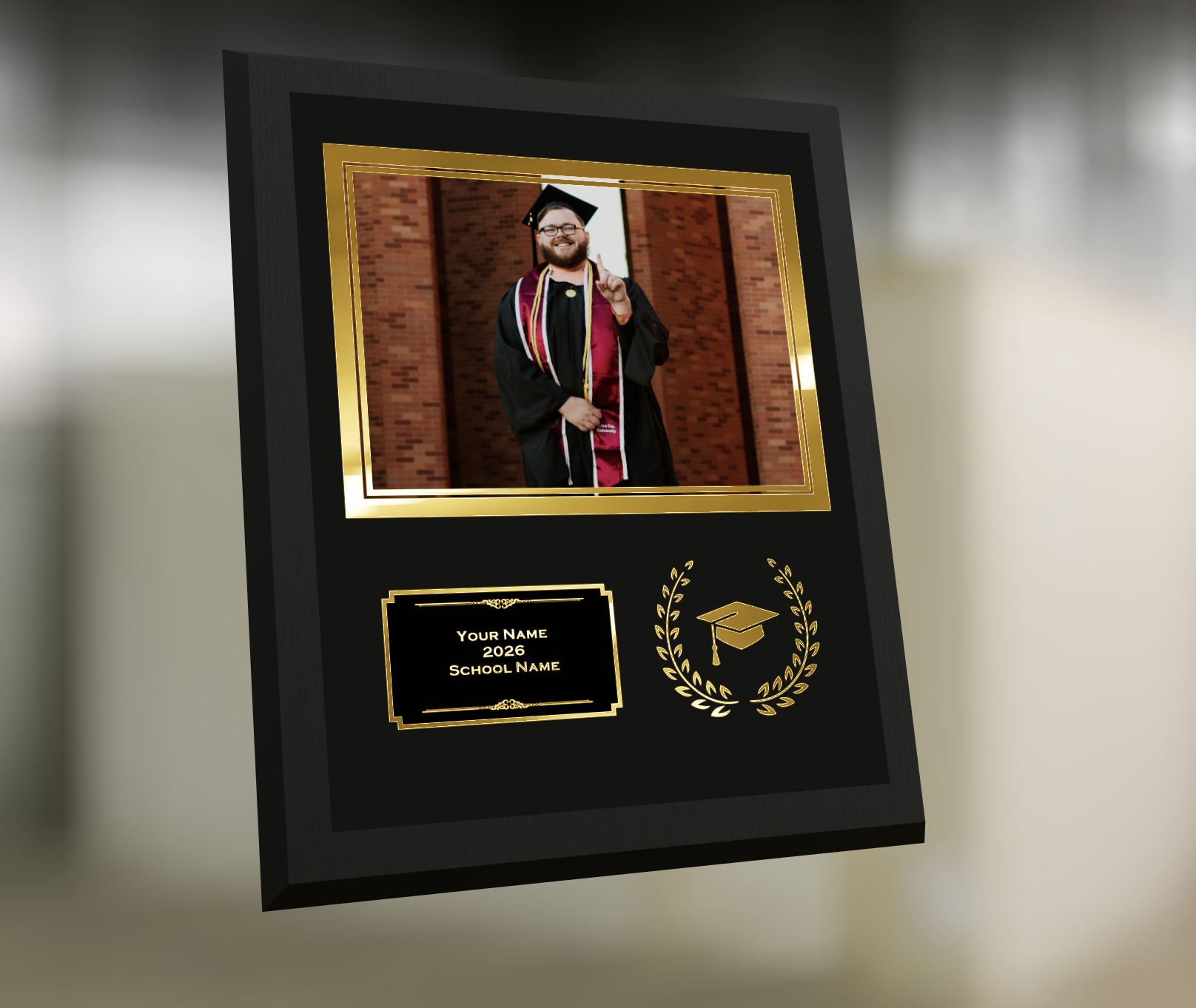
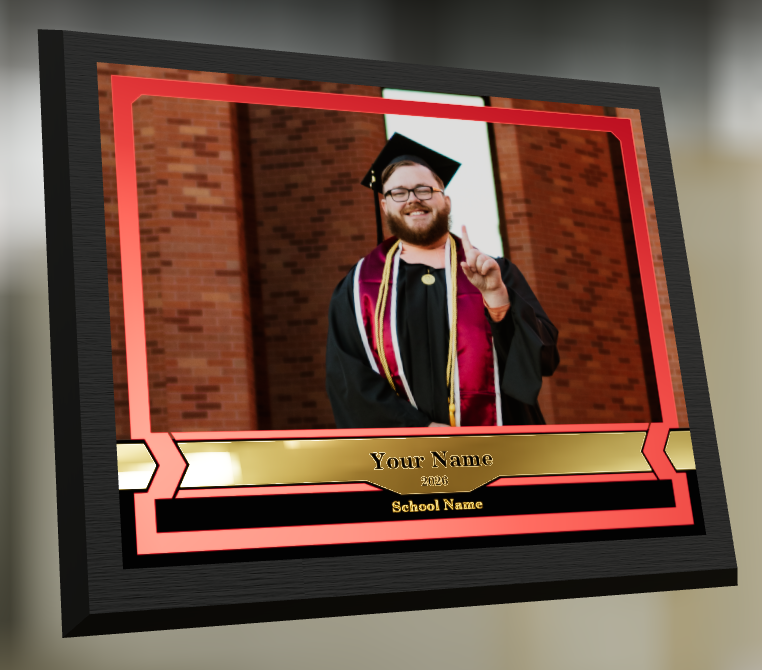
🖼️ Big Product Upgrade: Horizontal Orientation for 3D Plaques & Prints

End customers now have more flexibility when ordering these 3D-rendered products:

🎓 Graduation Plaque now supports a new horizontal design

  • • 🔄 Customers can switch orientations during the live 3D render
  • • 🖼️ Updated 2D render support included as well

🪧 Premium Plaque now supports a horizontal design

  • 🔄 Orientation can be switched during the live 3D render

🖨️ Premium Print now supports a horizontal design

  • 🔄 Orientation can be switched during the live 3D render

✍️ Caption preview fix: Premium Print/Plaque now correctly reflect the default “Line 2” in the 3D render before a shopper enters their own text

These updates make it easier to sell premium products even when the “best” shot isn’t a perfect vertical crop.

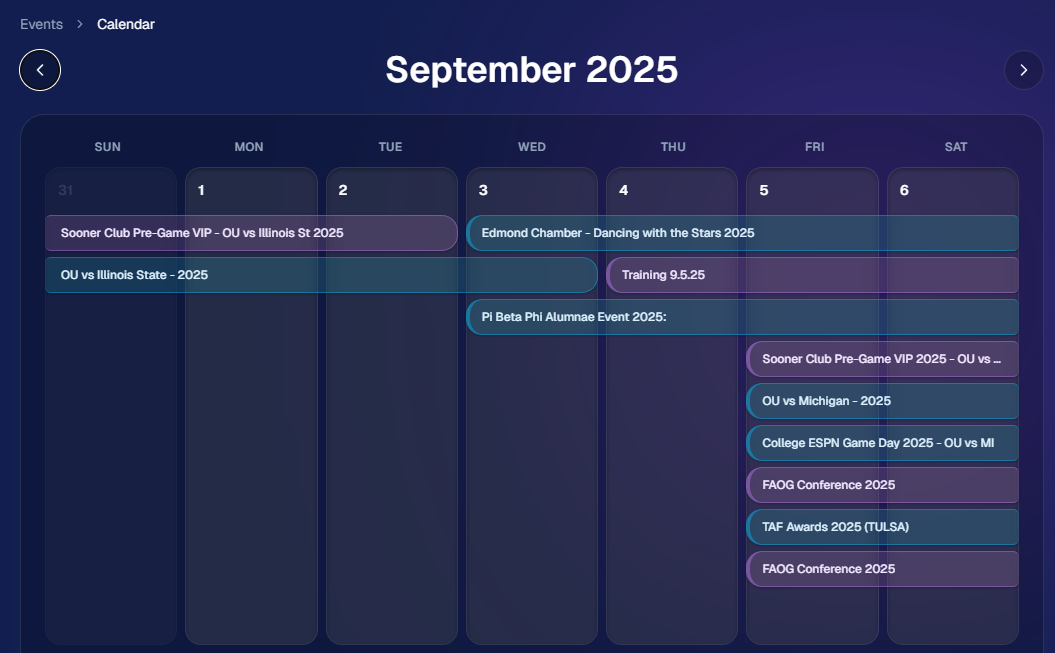
📅 New Dashboard Event Calendar View

Prefer a more visual way to plan and review your schedule?

🗓️ Event Calendar is now available via the calendar button on the Event List page

👀 Great for spotting what’s coming up at a glance, instead of scanning a long list

🌀 LiveLoop™: PhotoTag Links

LiveLoop™ just got more flexible:

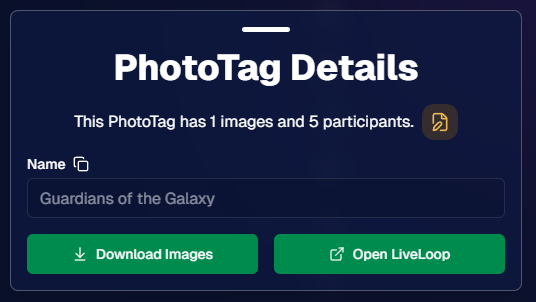
🏷️ PhotoTags now have LiveLoop links

  • • Found in a couple places on the PhotoTag page in the Dashboard
  • • Pulls in new images automatically, just like a normal LiveLoop™

🧾 Cleaner titles & history

  • • LiveLoop page now shows the Event name in the title bar, history, and links
  • • PhotoTag links show as: PhotoTagName – EventName

Perfect for running separate slideshows per team, division, day, or group without juggling multiple Events.

🖥️ Dashboard Improvements

🧹 New “Clear” button in Manage Images select mode (clear selections without re-entering select mode)

📋 PhotoRoster uploads improved:

  • • 📞 Additional phone columns now ignore parentheses (like main phone)
  • • 🔀 Columns can be in any order (matching Event roster upload behavior)

🔗 Fixed Image Details lightbox link for images manually removed on Participant Details

🧾 Positive ID Code PDF sorting updated:

  • • A–Z participants with no PhotoTag
  • • Then PhotoTags A–Z (participants A–Z inside each)
  • • Then blank cards at the end

🛍️ Retail & Check-In Updates

🚫 Invisible Events are now truly inaccessible

  • • If an Event is marked invisible, its retail site + check-in pages now show an “Event is no longer available” screen

🌎 Positive ID check-in phone formatting helper

  • • If an existing registration code has a phone without “+”, we’ll append “+1” to default to US country format (unless it already starts with “+” for another country)

🧩 Fixed a retail site crash when the Statuette Ornament was included in a package

🛡️ iPhone GalleryGuard now loads faster

🛠️ Misc Fixes & Improvements

🖨️ Backprinting updates for existing Events when your business info is updated (previously it was locked to whatever info existed when the Event was created)

✉️ Fixed a strange edge case where email-only participants wouldn’t send if another email in the queue contained “.@”

✅ Improved email validation across all web check-ins

That’s the week!

Between horizontal premium product designs, PhotoTag-level LiveLoops™, and a Calendar view for Events, you’ve got a lot more control over how things look and how you run the day. 💫

Keep creating magic,

Candy 🍬

Weekly Recap: Upgraded Grad Plaque, Retail Polish & More🎓✨
Feature Updates
December 5, 2025

Weekly Recap: Upgraded Grad Plaque, Retail Polish & More🎓✨

5
 minutes read
Hey photo friends! 👋


Candy here. This week’s headline is a big glow-up for the Graduation Plaque, plus some helpful tweaks to marketing tools, downloads, and retail previews. Here’s what changed.

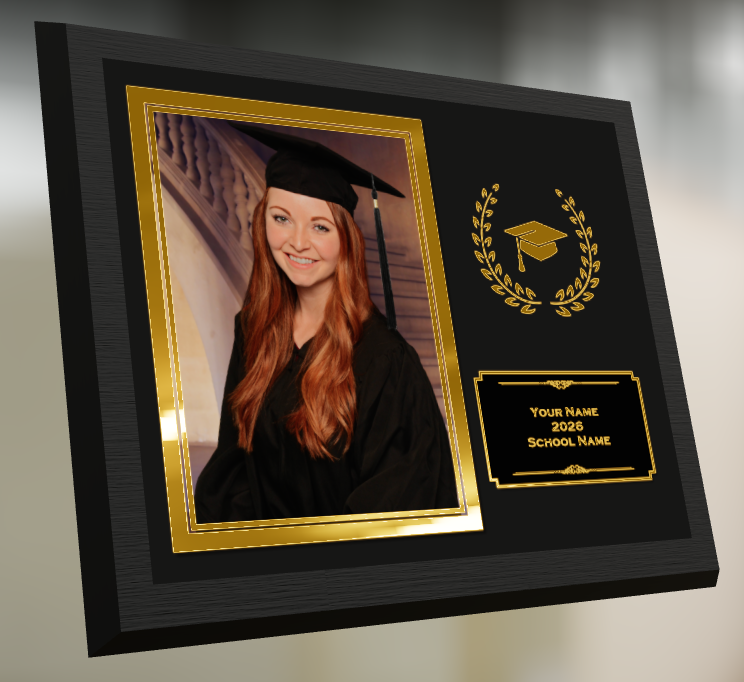
🎓 Graduation Plaque: New Look, New Render

The Graduation Plaque just got a major upgrade:

  • 🆕 New physical product with an updated finish and feel
  • 💰 Cost increase of $0.48 to match the upgraded production
  • 🌀 New live 3D render on the store sheet (like the Premium Print/Plaque experience)
  • 🖼️ 2D render on the checkout sheet for performance
  • 🔻 Diamond Press upsell removed (was available on the previous version, may return in the future)

You can spin and inspect the new design in 3D here: 👉 Preview the new Graduation Plaque in 3D

__wf_reserved_inherit

Perfect for seniors and ceremonies where your customers want a keepsake that really feels special.

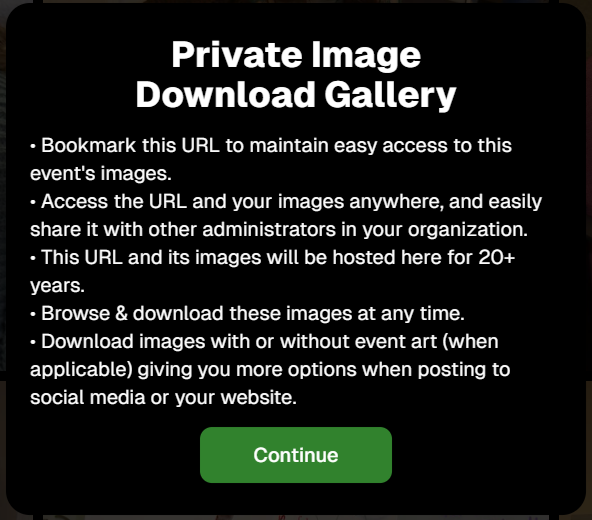
🔒 Private Image Download Gallery

The Private Image Download Gallery now has a new landing popup.

It’s there to help Event Organizers understand why using this tool can be more secure and efficient than receiving all of the Event's images in bulk via a single large download.

__wf_reserved_inherit

📊 Dashboard Updates

📈 Marketing History chart improvements

  • Chart is now hidden when empty, so no more blank space
  • You can switch between Daily / Weekly / Monthly views

📑 Participant Download spreadsheet upgrades

  • Now includes each participant’s retail gallery URL
  • Handy if you’re doing third-party marketing or need to drop direct links into outside tools or messages

🛍️ Retail Site Improvements

🔘 Photo Button render updated

  • New live render that is larger, cleaner, and has no background
  • Matches the style of other renders
  • Render assets are about 15% smaller (faster loads)

⬇️ Press-and-hold download wording fixed

  • Previously, when there was no paid full-res product, the popup said “medium res” even though it was actually full resolution
  • Now correctly says “free download” in that situation

📸 Press-and-hold download fixed on FreePortraits

  • Press-and-hold works properly again on FreePortraits Events

🖼️ Luxe Prints artwork fix

  • Store sheet no longer shows artwork overlays on Luxe Prints (since art isn’t available on that product, yet!)

🧱 3D render cropping fix

  • Horizontal previews for 3D renders on the store sheet now use a center crop, not a full-fit that squished the image in the render, whoops!

🧩 Misc / FreePics GO

👥 Group image flagging in FreePics GO!

  • You can now flag images as Group Photos in FreePics GO! via the Dashboard
  • Works similarly to other non-Quic event programs and keeps group images organized for marketing and gallery behavior

That’s it for this week!

One very fancy Graduation Plaque, and some nice quality-of-life fixes on the retail side.

Keep doing great work,

Candy 🍬

Let’s get in touch

If you’re a photographer looking to add NowCandid™ services to your wheelhouse, set up a call with us!

How to customize formatting for each rich text

How to customize formatting for each rich text

How to customize formatting for each rich text

How to customize formatting for each rich text

How to customize formatting for each rich text

What’s a Rich Text element?

The rich text element allows you to create and format headings, paragraphs, blockquotes, images, and video all in one place instead of having to add and format them individually. Just double-click and easily create content.

A rich text element can be used with static or dynamic content. For static content, just drop it into any page and begin editing. For dynamic content, add a rich text field to any collection and then connect a rich text element to that field in the settings panel. Voila!

Headings, paragraphs, blockquotes, figures, images, and figure captions can all be styled after a class is added to the rich text element using the "When inside of" nested selector system.

  • List One
  • List Two
  • List Three
  • List Four
  • List Five

This is a link

This is bold text