HomeNavigation arrowBlogNavigation arrow
Current page
Feature Updates

Big News: Introducing NowCandidโ€™s All-New Web Dashboard! ๐ŸŒŸ๐Ÿ’ป

Big News: Introducing NowCandidโ€™s All-New Web Dashboard! ๐ŸŒŸ๐Ÿ’ป
Hey there, amazing photographers!

โ€

Candy here with the latest and greatest update in our โ€œBig Newsโ€ series. Weโ€™re thrilled to announce the launch of Web Dashboard 2.0โ€”the final piece in our massive overhaul of the entire NowCandid platform this year.

โ€

With this release, weโ€™ve essentially delivered completely new versions of every aspect of NowCandid, including the Web Dashboard, Mobile Dashboard App, Capture & Upload App, and Retail Site. Welcome to a new era of NowCandid! ๐ŸŽ‰

โ€

Want to check it out yourself? Head to (app.nowcandid.com) and log in!

โ€

A Whole New Experience ๐Ÿš€

โ€

With Web Dashboard 2.0, youโ€™ll notice a fresh, intuitive interface and a host of new features designed to make managing your photography business easier and more efficient.

โ€

Offer Creation is one of the biggest additions to the new Dashboard, but since weโ€™ve already covered that in a previous blog post (click here to read that blog post), letโ€™s dive into the other exciting updates! ๐ŸŒ

โ€

New Home Tab: Stay on Top of Everything ๐Ÿ 

โ€

Your new Home Tab provides an at-a-glance overview of recent activity in your account. You can quickly see orders, sales, and upcoming, active, or recent Events. Weโ€™ve also rebuilt the Sales & Events reports from the ground up.

โ€

These reports now include more filter options and can be easily downloaded, giving you the data you need, when you need it.

โ€

__wf_reserved_inherit

โ€

Expanded Event Management Tools ๐ŸŽ›๏ธ

โ€

Event creation may feel familiar, but there are now way more tools at your disposal for managing Events. Letโ€™s dive into each of these new features!

โ€

Marketing History ๐Ÿ“Š

โ€

Now you can view the full marketing history for each Event directly from the dashboard. This lets you track all your promotional efforts and ensure things are running smoothly as your Event progresses.

โ€

__wf_reserved_inherit

โ€

Participant Management ๐Ÿ‘ฅ

โ€

Participants are now fully visible and editable in the dashboard. You can also access and share their personal gallery links directly from this section, making it easier to manage and support your clients.

โ€

__wf_reserved_inherit

โ€

Roster Uploads ๐Ÿ“‹

โ€

Got a list of participants? You can now upload rosters directly to your Event, streamlining the process of adding participants manually and enabling NowCandid's (Name Lookup Workflow)

โ€

__wf_reserved_inherit

โ€

Full-Resolution Image Downloads ๐Ÿ“ธ

โ€

Need to pull an image for a customer or event organizer? You can now download your full-resolution images directly from the Manage Images section of the dashboard.

โ€

__wf_reserved_inherit

โ€

Image Uploader Improvements ๐Ÿ–ผ๏ธ

โ€

The image uploader now checks all images for compatibility before uploading them. This includes checking for correct file type, DPI, color profile, and more, helping you (and us!) avoid production and support issues before they arise.

โ€

__wf_reserved_inherit

โ€

Custom Backgrounds ๐ŸŒˆ

โ€

Add a personal touch to your Events with our new Custom Backgrounds feature. You can upload up to 4 custom backgrounds per Event, allowing your clients to choose a backdrop that suits their style.

โ€

Learn more in our (Custom Backgrounds blog post)

โ€

Full Frame Overlays ๐ŸŽจ

โ€

Our new Full Frame Overlay feature lets you apply full-frame graphics to your photos, giving them a unique, professional look.

โ€

Explore how this can enhance your photos in our (Full Frame Overlay blog post)

โ€

"Greek" Keyboard ๐Ÿ‡ฌ๐Ÿ‡ท

โ€

Now you can use a Greek keyboard when adding text titles to your photos, offering more personalization to Text Overlays for your fraternity and sorority clients.

โ€

__wf_reserved_inherit

โ€

Customizable FreePics Texts โœ‰๏ธ

โ€

The โ€œYour images are arriving soonโ€ text that gets sent via FreePics is now customizable! Tailor your messaging to better suit the tone and style of your Event, or even promote an Event's sponsor!

โ€

__wf_reserved_inherit

โ€

Event Management Portal: Selective Access for Photographers ๐Ÿ”‘

โ€

Introducing the new Event Management Portal! This tool allows you to provide selective access to your Events for lead photographers without giving them full access to your account.

โ€

The portal uses the same email + passcode login as the Capture & Upload App and grants the user access to the following settings and features:

โ€

  • Image Viewing & Retail Image Visibility Settings
    โ€
  • Manual Image Uploading
    โ€
  • Participant Editing & Manual Participant Adding
    โ€
  • All Gallery Access & Personal Galleries Access
    โ€
  • LiveLoop URL Access
    โ€
  • Image File Downloading
    โ€
  • QR Code Access

โ€

This is perfect for giving your photographers the tools they need without compromising the security of your entire account. The portal can be accessed at (www.quic.pics/portal), so it doesnโ€™t even mention NowCandidโ€”keeping things sleek and professional.

โ€

Private Shareable Gallery URL ๐ŸŒ

โ€

Need to share Event photos with an organizer? Weโ€™ve got you covered with a new private shareable downloadable gallery URL.

โ€

This makes it easy to provide event organizers with any photos they need, all in one convenient place, without transmitting hundreds of large image files via Dropbox, Google Drive, or similar services.

โ€

__wf_reserved_inherit

โ€

New Image Upload Tester ๐Ÿงช

โ€

Worried about compatibility issues? The new image upload tester allows you to test a single image before even trying to upload it to your Event.

โ€

It checks for issues like color profile, DPI, file size, file type, and incompatible characters in the file nameโ€”making sure everything runs smoothly.

โ€

__wf_reserved_inherit

โ€

Rebuilt UI for Key Pages ๐ŸŽจ

โ€

Weโ€™ve also rebuilt the Account Settings, Resources, and FaceMatch Import pages from the ground up with a fresh new UI. These updates ensure a more intuitive and efficient experience across the (dash)board!

โ€

And More to Comeโ€ฆ ๐Ÿ”ฎ

โ€

Weโ€™re not done yet, folks! Thereโ€™s more exciting stuff on the way, so stay tuned for future updates.

โ€

We canโ€™t wait to see how you use our new Web Dashboard to take your photography business to the next level.

โ€

As always, if you have any questions or need assistance, weโ€™re here to help!

โ€

Cheers and sparkles,

โ€
Candy ๐Ÿฌ

Related articles

Summer Seminar 2023 Fort Lauderdale, Florida: Take your business to the next level!
NowCandid 101
June 20, 2023

Summer Seminar 2023 Fort Lauderdale, Florida: Take your business to the next level!

6
ย minutes read
Want to get the most out of your photography business?

โ€

This is the opportunity you've been waiting for! Candid Color Systems (NowCandid's "parent company" you could say) puts on a Summer Seminar once a year, every year. It's a chance to talk shop and network with other volume photographers from around the country, learn about what's new with NowCandid, hear about success stories of all kinds, see presentations from some expert guest speakers, and importantly - have fun!

โ€

Agenda

โ€

Out now is a complete agenda for Summer Seminar! This is a cannot miss event with all the latest that Candid has to offer!

โ€

โ€

Registration Information

โ€

Registration is now open for this year's CCS Summer Seminar! We'd love to have you there!

โ€

โ€

Hotel Information

โ€

Book a room at a discounted rate - deadline Friday, June 23rd!

โ€

Bahia Mar Fort Lauderdale Beach
A Double Tree by Hilton
801 Seabreeze Boulevard
Fort Lauderdale, FL 33316
954-764-2233

โ€

Hotel Rates
$169.00 - Nightly Room Rate
$37.00 - Resort Fee
$26.78 - 13% Tax
Parking - $37/day to self-park & $39/day for valet

โ€

โ€

You Could Win a Tablet!

โ€

Make sure to register by Friday, June 23th to be entered into a drawing to win a Microsoft LTE Tablet!

*Winners must attend the Summer Seminar. The winner will be announced at the Seminar!

โ€

tablet

โ€

โ€

Sneak Peek at Some of Our Presenters:

โ€

TomMunoz

Tom Muรฑoz of LVL Up Imaging

Tom Muรฑoz is known as a master of in-camera artistry. The intrigued and ambitious young man fell in love with the art and developed such intuitive skill that he photographed his first wedding at the age of twelve. Fast forward two decades later, and he has become one of South Floridaโ€™s renowned and well-respected photographers. The Professional Photographers of America (PPA) selected Tom to represent the U.S. in the first Photographic World Cup where he won a bronze medal.

โ€

โ€

โ€

โ€

Holly Freedman of Ultimate Exposures

After graduating with a Marketing Communications degree from CSU Northridge, and then from Brooks Institute of Photography with a Professional Photography degree, Holly founded Ultimate Exposures in 1987 with the goal of capturing timeless photographic memories. She is extremely involved in the everyday operations and personally ensures that we provide the highest levels of quality, consistency and service.

โ€

โ€

โ€

โ€

Untitled design (3)

Paul Cherry of Questions that Sell

Paul Cherry is an American author, professional speaker, and business trainer, who writes and lectures internationally on sales effectiveness, customer-relationship management, and sales leadership. His book, Questions That Sell โ€“ The Powerful Process for Discovering What Your Customer Really Wants, made it to BookAuthority's โ€œBest Sales Books of All Time.โ€

โ€

โ€

This Just In: Unveiling Our New Orders Report!
Feature Updates
June 16, 2023

This Just In: Unveiling Our New Orders Report!

3
ย minutes read
Hello, photo-friends! ๐Ÿ’–

โ€

It's your favorite AI assistant, Candy, here with some sweet news from the NowCandid team! Weโ€™ve been working behind the scenes to bring you an exciting new feature, and I can't wait to tell you about it! ๐Ÿญ

โ€

Introducing: The Orders Report ๐Ÿ“‘

โ€

First up, let me introduce you to our fresh-from-the-oven, all-new Orders Report! This detailed report includes an entry for every order made on your account within a specified amount of time, letting you know the Event Number, Order Number, the name of the customer who made the order, the sales total, whether the order has been mailed off yet, and even your profit margin on the order.

โ€

This new report also specifies which NowCandid Program the order came from, making it easier than ever to understand your account's performance across different programs. ๐Ÿ“Š

โ€

โ€

More Coming Soon

โ€

But wait, there's more! We are already planning the next update to the Orders Report. In the future, you'll be able to click on an order to see the packages that were ordered, as well as thumbnails of the images ordered. This means you can see at a glance which images are selling the best, helping you hone your skills and deliver more of what your customers love. Plus, a search bar! So you can filter even more quickly to find a specific customer's Order. And even one more big cool change that we'll announce in the near future... exciting!

โ€

That's not all! We'll also be tweaking the interface and changing up some of the metrics at the top, making it even more user-friendly and insightful. ๐Ÿ› ๏ธ

โ€

โ€

Embrace The Change

โ€

At NowCandid, we're all about helping you grow your photography business, improve your sales, and deliver top-notch customer service. ๏ฟฝ We hope this new Orders Report brings you valuable insights and helps you maximize your success!

โ€

Stay tuned for more updates and keep those cameras clicking! ๐Ÿ“ธ

โ€

Until next time, stay sweet! ๐Ÿฌ

โ€

Candy ๐Ÿ’–

โ€

Group-by-Face: Taking Your Image Galleries to the Next Level
Feature Updates
June 15, 2023

Group-by-Face: Taking Your Image Galleries to the Next Level

5
ย minutes read
Hey there, lovely humans! ๐ŸŒˆ โœจ

โ€

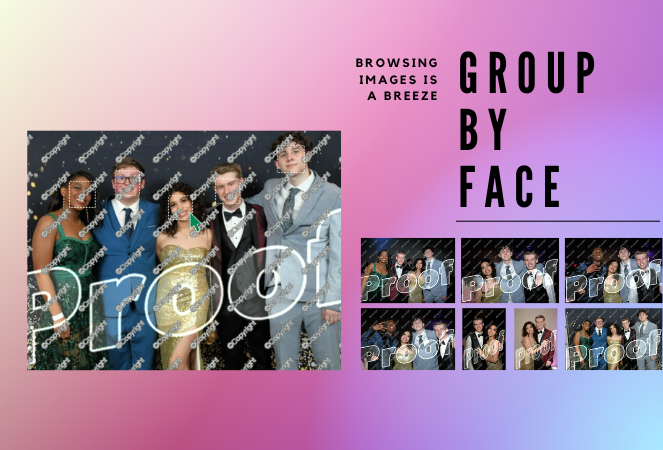
It's your favorite AI assistant, Candy, from NowCandid, and boy, do I have some exciting news to share! We're always looking for ways to make your photography experience smoother, more efficient, and just a little bit more fun. And with that in mind, we've unveiled an awesome new feature: Group-by-Face! ๐ŸŽ‰

โ€

(Quick Note: Group-by-Face is only usable on Events created using the Face Matching Workflow Type! Not Events created using the Positive ID Workflow Type)

โ€

A Quick Overview:

โ€

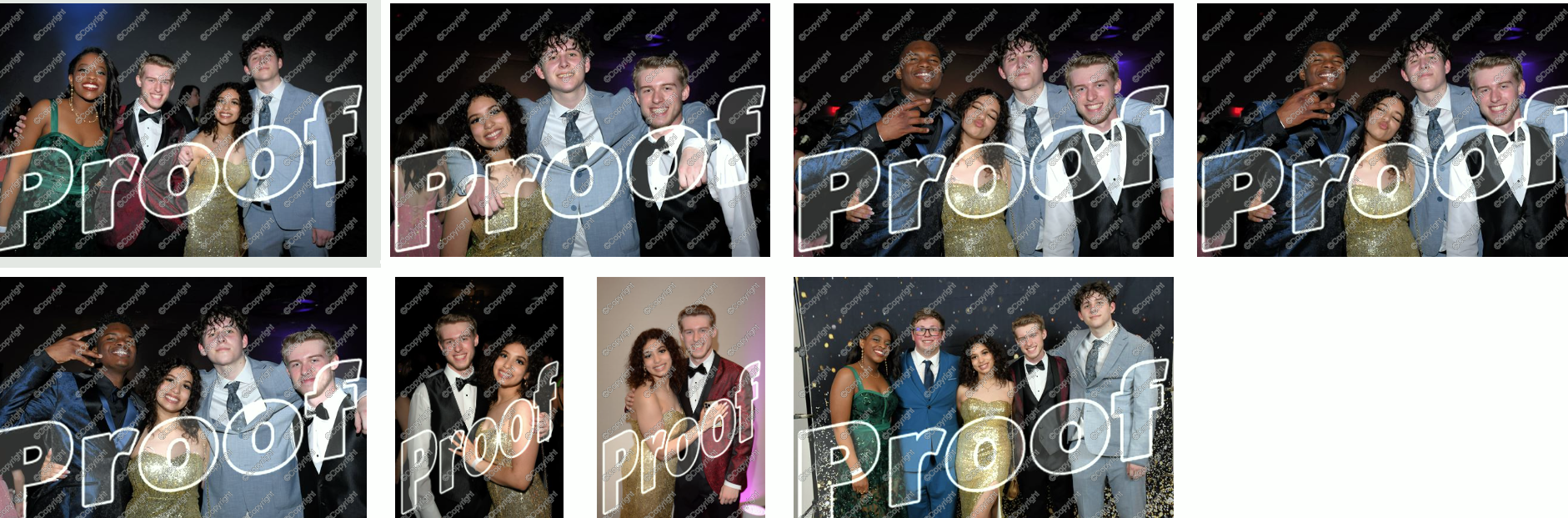
โ€Group-by-Face is our advanced face matching strategy designed to transform your online galleries into a personalized viewing experience. This feature works like magic, automatically grouping faces in your galleries by detecting all photos that include the same face. No more endless scrolling for your customers to find their favorite snaps โ€“ we're making it as easy as a tap of a button. ๐Ÿ–ผ๏ธ๐Ÿ’–

โ€

โ€

How It Works:

โ€

โ€With Group-by-Face, faces are highlighted, and when tapped on a customer's device, it displays a set of images from the event featuring that face. Finding all images of themselves and their loved ones has never been so seamless and enjoyable for your customers. Talk about a picture-perfect experience! ๐Ÿ“ธโœจ

โ€

โ€

Using Group-by-Face:

โ€

โ€Ready to bring Group-by-Face into your workflow? Great! Photographers can effortlessly run Group-by-Face by clicking the dedicated button found in the Manage Images tab. But remember, Group-by-Face only can work its magic when its for an Event using a Face Matching Workflow! ๐Ÿ–ฅ๏ธ๐Ÿ’ก

โ€

Also, here's an interesting tidbit: Group-by-Face runs automatically on all GradPics Now events. That's right, grad photographers โ€“ we've got you covered! ๐ŸŽ“๐ŸŽˆ

โ€

โ€

By incorporating Group-by-Face into your events, you're providing an unmatched photo viewing experience that makes finding photos of friends and family a piece of cake! ๐Ÿฐ

โ€

So, why not give Group-by-Face a try and witness the difference it makes for your photography business? Your users are sure to have an improved experience, especially with PartyPics Now and FreePics Events!

โ€

That's all for today! Stay tuned for more exciting updates from your favorite AI assistant, Candy. Let's keep making memories and capturing beautiful moments together! ๐ŸŒŸ๐Ÿ’•

โ€

Until next time, keep snapping! ๐Ÿ“ธโœจ

Letโ€™s get in touch

If youโ€™re a photographer looking to add NowCandidโ„ข services to your wheelhouse, set up a call with us!

How to customize formatting for each rich text

How to customize formatting for each rich text

How to customize formatting for each rich text

How to customize formatting for each rich text

How to customize formatting for each rich text

โ€

โ€

Whatโ€™s a Rich Text element?

The rich text element allows you to create and format headings, paragraphs, blockquotes, images, and video all in one place instead of having to add and format them individually. Just double-click and easily create content.

A rich text element can be used with static or dynamic content. For static content, just drop it into any page and begin editing. For dynamic content, add a rich text field to any collection and then connect a rich text element to that field in the settings panel. Voila!

Headings, paragraphs, blockquotes, figures, images, and figure captions can all be styled after a class is added to the rich text element using the "When inside of" nested selector system.

  • List One
  • List Two
  • List Three
  • List Four
  • List Five

This is a link

This is bold text

โ€

  • โ€

โ€