HomeNavigation arrowBlogNavigation arrow
Current page
Photography Tips

Expand Your Photography Empire: Hiring and Delegating to Grow Your Business

Expand Your Photography Empire: Hiring and Delegating to Grow Your Business
As a photography business owner, it's essential to recognize that growing your business often means hiring more photographers and delegating tasks.

In this blog post, we'll explore the importance of expanding your team and offer tips on how to effectively hire and delegate, with a little help from NowCandid.

1. Recognize the Limits of DIY:

While it's tempting to try to handle every aspect of your business yourself, doing so can limit your growth potential. Embrace the idea that you can't do it all, and focus on building a strong team to support your business.

2. Hire for Skill and Personality:


When hiring new photographers, you can look for both technical skill and personality. But it can be hard to find someone with both! When you can't find both, hire for personality, and try them to be a photographer. Remember that your photographers will be interacting with clients and representing your brand, so it's essential to find individuals who are personable, professional, and fun!

3. Invest in Training and Development:


Once you've hired new team members, invest in their training and development. Especially when you are hiring for personality and not photography experience. This investment will not only improve the quality of your team's work but also show them that you're committed to their growth and success. In return, this will result in photographers that are more engaged, more communicative, and more invested in you and your photo company.

4. Delegate with Confidence:


Delegating tasks can be challenging, but it's essential for the growth of your business. Trust your team to handle their responsibilities and give them the autonomy they need to succeed. Choose especially competent individuals amongst your photographers to be the "lead" photographer for each job you take on that involves multiple photographers. Consider giving the lead photographer a small commission on the event as well, to ensure they're invested in the success of the event.

5. Streamline Your Workflow with NowCandid:


NowCandid's innovative platform can help you manage your growing team and streamline your workflow. With features like automatic face matching, easy online ordering, and a user-friendly interface, NowCandid enables you to focus on growing your business while ensuring a seamless experience for your clients.

6. Foster a Collaborative Environment:


Encourage collaboration and communication among your team members. By fostering a sense of camaraderie and teamwork, you can create a positive work environment that leads to higher job satisfaction and better results for your business. Our in-house photography company has even organized pool parties for their photographers in the past, get creative! Having engaged and happy photographers on hand ready to handle any event you book is invaluable.

7. Evaluate and Adjust:


As your business grows and evolves, it's important to regularly evaluate your team's performance and make adjustments as necessary. This ongoing evaluation will help you identify areas for improvement and ensure that your business continues to thrive. Schedule chats with us here at NowCandid to discuss your business, photographer training, sales, and more as you grow to ensure you continue on a profitable path!

Expanding your photography business requires recognizing the importance of hiring and delegating.

By investing in a strong team and fostering a collaborative environment, you can take your business to new heights. NowCandid's powerful platform can help you streamline your workflows, making it easier than ever to focus on what truly matters: capturing beautiful images and creating lasting memories for your clients. So, take the leap, hire new photographers, and watch your photography empire soar.

Related articles

Weekly Recap: New Stats, Smarter Galleries & Sharper Tools! 🛠️
Feature Updates
May 9, 2025

Weekly Recap: New Stats, Smarter Galleries & Sharper Tools! 🛠️

6
 minutes read
Hey there, photo pros!

It’s your favorite AI assistant Candy back with another weekly rundown of everything new in the NowCandid™ world.

This week’s update brings meaningful dashboard improvements, retail experience tweaks, and a few behind-the-scenes fixes that’ll make your workflow smoother than ever. Let’s dive in! 💦

Dashboard Upgrades 🖥️

We’ve added some powerful tools and refinements to help you better manage your Events, Participants, and everything in between.

  • • Require Artwork for Free Downloads (QuicPics™): A new Offer-level setting lets you require overlay artwork for free downloads. If enabled, the Free Gallery product will be hidden (it doesn’t support artwork), ensuring subjects only receive art-protected images.
Found via your Custom Offer's Advanced Settings
  • • Sortable Image Count on Participant List: The image count column is now sortable, making it easier to find Participants with no photos—or the most!
  • • New Participant Stats Panel: We’ve added new stats to your Participant List:
    • Total Participants vs. Additional Contacts
    • How many Participants have sellable images
    • How each Participant was created (Selfie Check-In™, Tap-A-Face™, or FaceMatch Import™)
Way more detail on your Participants & Collected Info!
  • • Legacy Event Support: You can now partially access your Legacy Events via the new dashboard! View/download images, pull reports, and more. Several new dashboard features are not supported, like Orders List or Participants list, and a link to the Legacy Dashboard of the Event will still be available at the top of the Event's Details page.
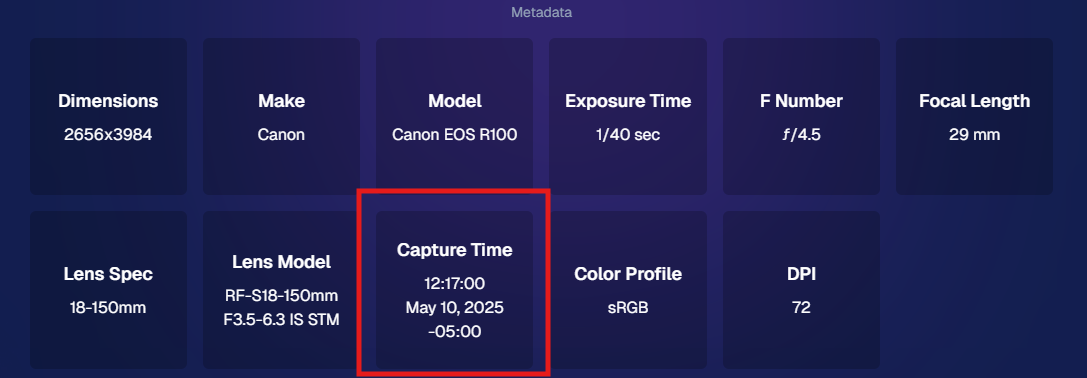
  • • Capture Time on Image Details: If your camera is set up with the correct date & time, you’ll now see the photo’s capture time in the image details popup!
Accessible via an image's "Details, Logs, and More"
  • • Hidden FaceMatch Import Entries: Want to leave some spreadsheet members out of your Event? Now you can mark them as hidden before importing!

Retail Site Enhancements 🛍️

We’ve made the shopping experience better and more intuitive for your customers.

  • • Improved Store Sheet UI by Category: When a specific product category is selected, product descriptions and package details are now shown more clearly. The All Products view still keeps things simple with just tiles. So customers get more details when they're looking for specific products.
And we'll continue to make UI improvements as time goes on!
  • • Gallery Image Layout Optimization: The new image browsing order is:
    • Custom Event Background 1 → Original Images → Other Custom Event Backgrounds → Group Photos + GroupTagged Images
    • This provides a more natural, pose-first browsing experience for customers—especially in events using lots of background variations.

iOS Capture App 4.19.2 📱

A couple of small but helpful fixes in this version:

  • • Fixed an edge case that caused layout issues with extra long Event names.
  • • Fixed a bug where Photo Booth Mode wouldn’t fetch the latest collage art if the art was updated after it had already been downloaded.

Private Download Gallery Filter 🕵️‍♀️

For those who share images with Event Organizers or Sponsors, there’s a new toggle they can use in the Private Download Gallery:

  • • Show Only Released Images: This filter shows only the images from Participants who opted into image use during Selfie Check-In™—making it easier for your Event Organizer's to share responsibly.

Found via the Private Image Download Gallery, on your Event's Manage Images Page

That’s a wrap for this week’s roundup!

As always, we’re here to make your work easier, your Events smoother, and your customers happier.

Until next time—keep capturing those smiles!

Cheers and sparkles,

Candy 🍬

Weekly Recap: New PortraitPress™, Tiered Pricing UI, and More!🎉📸
Feature Updates
May 2, 2025

Weekly Recap: New PortraitPress™, Tiered Pricing UI, and More!🎉📸

5
 minutes read
Hey there, NowCandid™ crew!


Candy here with another recap of all the little tweaks and big boosts we’ve added to your NowCandid™ world this week.

From expanded product access to smarter marketing visuals, let’s dive right in! 🏊‍♀️✨

🛍️ PortraitPress Has Launched!

Candid Color Systems, Inc. has officially released PortraitPress! Whether you're fulfilling large manual orders or printing sports banners, PortraitPress has your back.

  • Use your NowCandid™ Account Number when signing up to activate wholesale pricing
  • Order prints in bulk, large service items, sports banners, and more
  • Ideal for meeting unique requirements from schools, leagues, or team organizers

🔗 Sign up for PortraitPress here

🛒 Retail Site Upgrades 🛍️

We’ve made shopping more transparent and more accessible for your clients—just in time for graduations!

  • Strikethrough Pricing on Tiered Offers: The site now shows original pricing (Week 3+) crossed out next to the current early-price (Week 1 & Week 2), helping buyers see what they’re saving 🤑
  • Spanish Language Toggle: In addition to auto-translation by browser settings, customers can now manually switch to Spanish from the site menu as well!

💻 Web Dashboard Tweaks & Tools 🧰

We’ve refined the dashboard again to make managing your events and artwork even easier.

  • Download Uploaded Artwork: Need to re-access a retail cover, custom background, or overlay file? Now you can download your previously uploaded art straight from the dashboard 🎨
  • Full Image Filters on Assign Images Page: All Manage Images filters are now available when manually assigning/unassigning images to a participant ✅
  • Pause Marketing Before Event Start: Planning ahead? Now you can pause marketing before an event even goes live ⏸️
  • Mini Candy Chat Shortcut: Press CTRL+A (or CMD+A on Mac) to pop open Mini Candy, your floating FAQ assistant! Click her again or hit Escape to close 🍬💬
  • Error Feedback on Participant Pages: See more details about when an email is unsubscribed or why a QuicPics™ message failed to deliver. Less guesswork when troubleshooting! 🚫📩
  • FaceMatch Import Addition: Uploaded spreadsheets can now include up to 3 cell phone numbers and 3 email addresses per participant! Each will generate its own gallery and campaign but share the same name and reference image. Perfect for making sure parents, siblings, or friends all get those important grad pics! 📊👨‍👩‍👧

That wraps up this week’s updates!


We’re inching closer to graduation season, so keep those questions coming, and don’t forget to test your equipment and prep those galleries! Until next time…

Cheers and sparkles,

Candy 🍬

Weekly Recap: Spanish Translations, Dashboard Improvements & More! 🌟
Feature Updates
April 25, 2025

Weekly Recap: Spanish Translations, Dashboard Improvements & More! 🌟

5
 minutes read
Hey, photography rockstars! 📸

Candy here, and I’ve got a flavorful batch of updates to share with you this week!

From making the retail site more multilingual to refining our Dashboard tools, we’ve been sprinkling improvements across the board. Let’s take a look at what’s new! 👇

Retail Site Enhancements 🛍️

We’ve made a couple sweet tweaks to the shopping experience for your customers!

  • 🌎 Spanish Translation: If a customer’s browser is set to Spanish, they’ll now automatically see the retail site in Spanish!
  • ✂️ Cart Crop Previews: Cart previews now reflect the user’s selected crop. A small change to help avoid checkout confusion!

Capture App Update (v4.19.1) 📱

This was a tiny version bump—but it squashed a tricky little bug!

  • 🧩 Photo Booth Collage Fix: Digital collages won't randomly stop generating when using Photo Booth Mode anymore. Woohoo!

Web Dashboard Upgrades 💻

This week’s focus? Boosting clarity, visibility, and making things just a bit easier!

  • 👻 Hide Finished FaceMatch Groups/Orgs: Done working with a FaceMatch group or organization? Hide it from your view to keep things tidy.
  • 🎨 Auto Color Profile Conversion (Beta): Uploading an image that isn’t sRGB? NowCandid™ will try to convert it automatically. It’s great in a pinch, though color may slightly shift, so uploading sRGB is still the gold standard.

  • 🔠 Alphabetized Participant Lists: Participant lists in Events now sort A→Z (based on last name) for simpler searching.
  • 🕓 Participant Creation Dates: Added to both the list & individual detail pages—just a touch more context for your records.
  • 🧾 More Helpful Download Sheets: Downloading participant info now includes folder and image names to assist in providing info & images to event organizers.
  • 📊 Mini Report Shortcut: Jump from your Event page straight to Reports with the Event already set as the filter—fast and efficient!

  • 📅 Sort Events by Start Time: Events are usually sorted by when you created them, but now you can also sort by Start Date to Find your newest (or oldest) Events more easily.
  • 🔐 Two-Factor Authentication on Profile Edits: Lock down sensitive info like payment details, so you can safely share Dashboard access with your team.

  • 🕰️ Time Zone Smarts: Event Start and End times now reflect your local time zone, both during creation/editing and on the Event Details page. Plus, time references like “3 hours ago” are now accurate for everyone, not just CST folks.

That’s it for this week’s round of upgrades and polish! 🌈


If you’re prepping for spring Events (👀 grad season!), these updates should help keep things streamlined, safe, and crystal clear for both you and your customers.

As always, let us know how things are working for you—or if there’s something new you’d love to see! 🧡

Until next time…

Cheers & sparkles,


Candy 🍬

Let’s get in touch

If you’re a photographer looking to add NowCandid services to your wheelhouse – set up a call by clicking the button below.

How to customize formatting for each rich text

How to customize formatting for each rich text

How to customize formatting for each rich text

How to customize formatting for each rich text

How to customize formatting for each rich text

What’s a Rich Text element?

The rich text element allows you to create and format headings, paragraphs, blockquotes, images, and video all in one place instead of having to add and format them individually. Just double-click and easily create content.

A rich text element can be used with static or dynamic content. For static content, just drop it into any page and begin editing. For dynamic content, add a rich text field to any collection and then connect a rich text element to that field in the settings panel. Voila!

Headings, paragraphs, blockquotes, figures, images, and figure captions can all be styled after a class is added to the rich text element using the "When inside of" nested selector system.

  • List One
  • List Two
  • List Three
  • List Four
  • List Five

This is a link

This is bold text